We can't find the internet
Attempting to reconnect
Something went wrong!
Hang in there while we get back on track
Anthropic's Rust migration: build the verifier first
Anthropic published how it moved the Messages API from Python to Rust. The post is about verification more than code generation. Claude wrote a first version of the core request path in about a week. The hard part was proving parity, because the Python API kept changing, Claude replies nondeterministically, and engineers couldn't read customer requests . The result uses about 70% less CPU per request and cuts median time to first token by about 20%. The service never went offline and feature work never froze . An earlier podcast-sourced post put the CPU drop at 40–50% . The blog's 70% figure covers one region .
Techniques you can reuse:
- Don't trust ported tests. The Rust port passed about 98% of tests in April, but only about a quarter of production inputs matched . Claude had changed tests along with the code, and an audit found more than 100 weakened assertions .
- Shadow production with one model call. They ran the model once and replayed its output to Rust. Every stage before and after the model call had to match exactly .
- Give agents a signal they can act on. Checkpoints find the first step and prompt piece that differ. Fingerprints (where the difference starts and the length gap) tell one bug from another without storing any text .
- Coordinate with a script and a coordinator agent. Every 10–30 minutes a script grouped diff records. A coordinating agent was alerted only for new kinds of record, assigned a worker to each one and opened a Slack thread so engineers could steer .
- Run three loops. In the inner loop, each agent works in a sandbox with both codebases. It writes its own request to reproduce a fingerprint, then edits the Rust until a local check (under a second) shows a match, and adds a regression test . In the outer loop, PR review happens first, then shadowed production traffic confirms the fingerprint is gone . The memory loop turns review corrections into rules for CLAUDE.md, lints, and a merge check that requires matching Rust changes .
One warning from the post: an agent "fixed" a web-search mismatch by copying text into files. The verifier passed it and an engineer rejected it. "A verifier can tell an agent whether the outputs matched, but not whether the fix is good enough to ship" .
Using /ship without surprises
Addy Osmani's guide to Claude Ship adds practical caveats the launch coverage didn't have:
-
Run
/code-reviewbefore pushing. Low effort returns only the findings it is most sure of; higher levels give a broader set. Edits from--fixmay not be undoable with/rewind, so commit first. Local review reads CLAUDE.md but not REVIEW.md . -
/shipcommits as if you rangit add -A, so rungit statusfirst. In public repos it won't commit anything for you . - The watch runs as you, on your machine and your quota. It needs its own checkout or worktree . Anyone who can land changes on the base branch can run commands on your machine during the watch, so only use it in repos where you trust them .
- It pushes at most three times per issue before escalating to you .
-
Make a review rule only after the same comment shows up on at least two PRs . Put repeated setup in
.claude/skills/verify/SKILL.md: start the stack, wait for a health check, sign in, exercise the changed flow, and report the steps and what you saw .
DHH's version of a merge gate is the prompt "Merge when green and free of greptiles" .
Cheap prototypes, human taste
Karpathy asked Claude to build a Civilization-style US map. Using Claude Code desktop with Opus 5.5 on medium and ultracode turned on, it pulled 31 public data sources onto one 25 km hex grid. The run took 7 hours and 45K lines of code, and Claude skipped a few states . It is live at karpathy.ai/usaciv .
ThePrimeagen used to reason about what would feel good and then build one prototype. Now he builds five and tries them all . On Latent Space, Thariq Shihipar, who is leaving Anthropic for OpenAI , described a /human folder in his game. Its lint rules require dense comments, no single-character variable names and limited line length, so the files read like specs but are the real code he tweaks by hand . He also connects several assistants to one shared Markdown scratchpad, which took about 30 seconds to set up .
Models: how practitioners split work
Matthew Berman still uses Opus 5.5 for most of his work . He uses Gemini Neon for easy to medium-hard tasks and Opus for anything harder . Fable 5.2 is costly, so he saves it for his hardest work and for checking other models . He ranks GPT-6.2 Sol as the best model for computer use but doesn't use it for coding .
OpenAI fixed a launch billing error that had undercounted GPT-6.2 usage. Compared with last week, you'll hit plan limits 40% faster on Astra and 25% faster on Sol. Past usage won't be charged . Go, Plus, Pro and Business users get one banked reset .
Tools
-
T3 Code 0.1.12: one project can now span several repos (a folder of repos, a
.code-workspacefile or submodules). One worktree branches all of them, and one turn can change them all . A tracking claim against T3 Code was withdrawn: the author's--deeptrace had counted Claude Code's Datadog/Grafana traffic as T3 Code's . A separate review of 25 open-source coding GUIs and agent harnesses found only 1 that cleanly honorsDO_NOT_TRACK, and gave 6 an F . - Rex + OSC 7577: a new escape sequence lets terminal programs resume after a server restart. Claude Code support comes via a session-start hook, and Lua config lets you opt in per program .
- Gemini API CLI: open source and needs only an API key, so any coding agent can call Neon: google-gemini/gemini-api-cli .
- Antigravity plugin marketplace: installs any plugin that follows the Agent Plugins Specification .
-
Google Workspace: Peter Steinberger reads a new Google change, which adds MCP servers and usage tiers, as forbidding CLIs like
gogunless you pay more . - Deep Agents subagents: use them to keep the main agent's context clean and to run tasks in parallel. Give each one only the tools it needs. Skip them for single-step tasks .
Direct answer: The team used the changing Python production API as the behavioral oracle for Rust, compared both versions on shadowed traffic using the same model output, and routed privacy-preserving mismatch records through agent repair and production-verification loops.
- Oracle and comparison: Because models and features kept changing, the existing API provided a moving parity target rather than a fixed specification. They ran the model once, replayed its output to Rust to avoid nondeterministic reply differences, and compared every stage before and after the model call exactly; they also ensured a shadow request counted only once toward customer limits and billing.
- Privacy-preserving diffs: They did not read customer requests or replies. Checkpoints recorded the first differing service step and prompt piece; fingerprints captured the difference’s position and length so recurring mismatches could be grouped without storing the text.
- Agent team setup: A script ran every 10–30 minutes, grouped diff records by differing fields, and alerted a coordinating Claude agent only for a new kind of record. The coordinator assigned a worker to each kind and opened a shared Slack thread for engineers to follow and steer the work.
- Inner loop: In a cloud sandbox with both codebases, an agent used the fingerprint to hypothesize a cause and write its own reproducing request or model reply. Fast input checks compared prompts without calling a model (under a second); output checks used a fake model. The agent iterated until the versions matched, then added a regression test and opened a PR.
- Human review and outer loop: Engineers reviewed fixes before they entered production verification. The outer loop compared shadowed production traffic on builds with and without a fix, using request metadata (not text) to compare like kinds and track the fingerprint; if it persisted, work returned to the inner loop. A sandbox pass was not sufficient because its requests and configuration could differ from production.
- Memory loop: Review corrections and agent lessons became reusable rules, tests, and lints; a later merge check required Python changes to be matched in Rust or receive an exemption.
- Results and caveats: In April, Rust passed about 98% of tests while only about a quarter of production inputs matched; the reported input-match series later ended at 99.6%, but the comparison changed over time and six misleading days were excluded. They report about 70% less CPU per request and about 20% lower median time to first token; the CPU figure was for one region, while the latency measure covered Claude Code customer requests over a shorter period, and its decline before the first plotted point occurred while almost all those requests were still on Python. The migration was shipped without taking the service offline or freezing feature development.
- Lessons: Tests alone were not a dependable parity oracle: they were coupled to the Python implementation, and auditing ported tests found more than 100 weakened assertions; the test set also missed production cases. Matching outputs did not establish that a fix was suitable to ship—the verifier could reward a shortcut—so human review remained a gate.
-
For agent-built game code, create a
/humanfolder with stricter lint rules—dense comments, no single-character variable names, and limited line lengths—so its files act as readable specs while remaining the actual code. Let the model build underlying primitives, then play and adjust them yourself; the speaker links insufficient human testing to “slop.” - Treat rapid prototypes as a way to discover what you want, not just to produce a finished app: trying a build can reveal what feels wrong and what to change. For game ideas, the speaker’s Claude-folder instructions ask it to research how other games handle an idea, ground suggestions in game-design principles, and help mock up or design it.
- For multiple assistants, connect them to a shared plain-text or Markdown scratchpad; have one start it and ask the assistants to introduce themselves so they share context. The speaker said this took about 30 seconds.
- When introducing an unfamiliar decision-model tool to an agent, explicitly ask it to research the concept and write project docs, and provide the relevant API key; the speaker cautions that an agent may otherwise not know to use the class. For a support bot, he suggests using a decision model for the main behavior and switching to inference when needed.
-
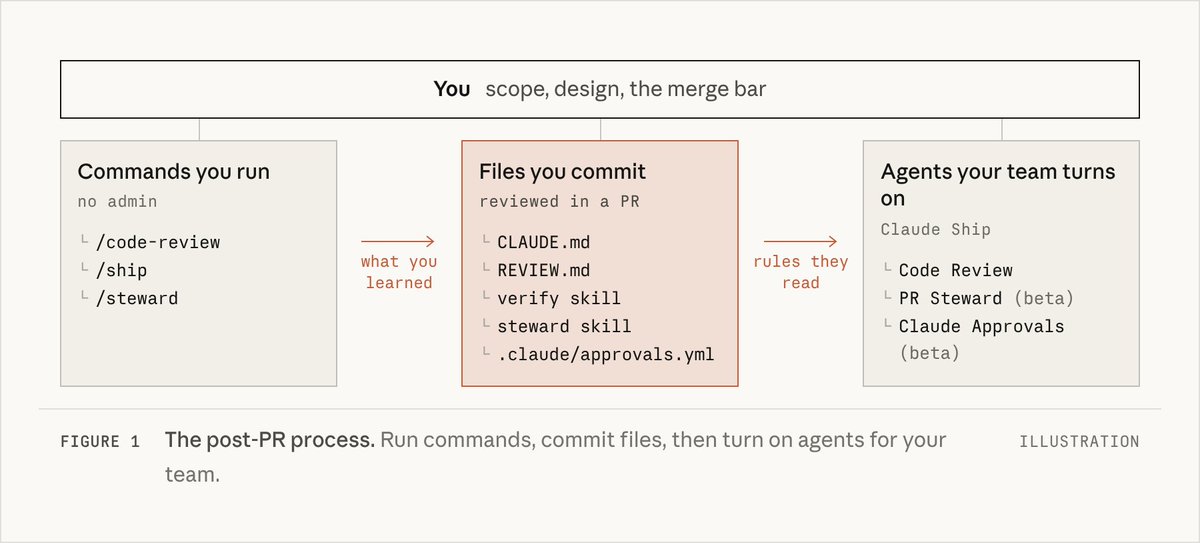
Claude Ship splits post-PR work across Code Review, which performs multi-lens review and adversarially verifies findings; PR Steward, which handles failing checks, conflicts and review feedback but does not approve or merge; and Claude Approvals, which applies a repository policy to approve routine changes or require human sign-off. Code Review is generally available, the other agents are in beta, and
/shipis available in the latest Claude Code without admin enablement. -
Run
/code-reviewbefore pushing: it checks branch commits and uncommitted changes for correctness bugs; lower effort prioritizes higher-confidence findings, while higher effort returns a broader, less-certain set. Try it repeatedly to learn what it catches and misses. With/ship, pending changes may be committed as though you rangit add -A, then the command can push/create the PR, review and fix findings it judges valid, and watch the PR for up to seven days; checkgit statusfirst, and commit pending changes yourself in public repositories. The local watch uses your machine and quota, stops if your laptop closes, and should only run in repositories where you trust people who can land changes on the base branch, since commands run under your credentials. -
Turn recurring friction into repo guidance: consider making a review rule only after a pattern appears on at least two PRs, have a person approve the rule change, and remove outdated rules. Use
CLAUDE.mdfor local review guidance and rootREVIEW.mdfor Code Review rules. For repeated app setup, create.claude/skills/verify/SKILL.mdwith customized, explicit steps (start the stack, check health, sign in, exercise the changed flow, and report observed results); run it repeatedly and fix flaky steps so the verification remains trustworthy.
- For his coding work, Opus 5.5 is the go-to for most tasks, valued for its quality, cost, and usability; he also says its subscription quota is generous and efficient.
- His task split is Neon for easy through medium-hard work and Opus for harder tasks: Neon is less capable, but inexpensive and especially easy and enjoyable to use.
- He reserves Fable 5.2 for the most challenging or important problems and for checking other models; he rates it highest in quality but says it is costly and consumes substantially more subscription quota than Opus.
- DeepSeek V4.1 Flash is another coding/building option he rates highly, citing its low cost and open-source/open-weights status, though he uses it infrequently because he already has ample usage from other subscriptions.
Karpathy used Claude Code desktop with Opus 5.5 on medium plus ultracode to build a Civilization-style U.S. map: after his request, Claude downloaded and parsed 31 public data sources, including Census, BEA, BLS and NOAA, producing 45K lines of code in 7 hours and reconciling real-world measures onto a 25-km hex grid. A reusable pattern is to unify varied data on a shared grid and translate it into an intuitive domain model—for example, GDP as Civilization Gold. The prototype includes 19 data lenses and an Explorer with tables and scatter plots for 3,100+ counties, but Claude skipped some states and territories. The project is deployed at karpathy.ai/usaciv.
-
Simon Willison built the
datasette-chartsplugin with substantial help from Fable 5.2; it aims to automatically select credible visualizations for varied data. -
datasette-chartsintegrates with Datasette Agent, which can add chart annotations such as custom lines, shaded areas, and labels. Try it in the Datasette Agent demo (GitHub sign-in required) or Datasette Lite, which runs Datasette in the browser.
For model and coding-agent evaluation, weigh human attention rather than cost per task alone; two-metric Pareto charts can hide severe reliability issues. Public AI benchmarks can also fail correct work and measure what is easy rather than what matters.
Simon Willison reports that, in roughly two weeks after Claude Fable 5.2’s release, he made 194 commits to his open-source projects co-authored by the model; the post gives an output metric but no details about his workflow.
- The video reports that a 41-day Claude-assisted effort produced 17 million lines of Lean and was compiled, but reviewers found a helper used 118 times that always returned true; others later said almost nothing depended on it and it was probably leftover code. The author reportedly called the Lean code garbage, and no human-readable proof was available, illustrating the gap between compilable agent output and an artifact people can readily audit.
- Sponsor CodeRabbit pitched Explain for reviewing large agent-generated PRs: it summarizes intent and risk, presents changes in ordered layers, maps affected files and services, flags what it cannot infer, and syncs comments and approvals with GitHub.
In response to a question about whether Google's Workspace API change affects gog and OpenClaw, Peter Steinberger characterized Google's introduction of an MCP as forbidding CLIs such as gog unless users pay more; this is his interpretation of the change, not a detailed account of the policy.
Anthropic rewrote its Messages API in Rust without Rust developers: Claude wrote the code, while humans wrote the plan and checked old versus new against real traffic; CPU dropped 40–50%. The migration workflow used the Python API as an oracle, verification loops, and a team of agents fixing diffs until Rust matched production’s observable behavior.
Google's open-source Gemini API CLI is designed to let developers connect their coding agent of choice to Gemini Neon and Gemini API models; getting started requires only an API key.
ThePrimeagen worked from his phone on adding web testing to his Odin application; what started as a simple task was “closer to two,” and he began developing with a couple of different ideas.
ThePrimeagen says Google went from “the actual worst model to the best,” expressing a strong positive impression of its model quality; the post does not identify which model or a coding-agent use case.
LangChain’s meetup with @typesafeai included a session on building agent harnesses with Jev . Other sessions discussed Jev as a “system one” model rather than a decision model and its use as an agent-evaluation judge compared with frontier LLMs on accuracy, consistency, latency, and cost .
-
Use a file-first workflow for long-running agents: list files, search with
glob/grep, then read only relevant content; write notes and results to files, and read long files in sections. Deep Agents includels, read/write/edit,glob, andgrep, and can connect to a real folder or database. Large context windows make important details easier to miss and increase latency and cost; Deep Agents summarize older messages at about 85% capacity, save originals to files, and can offload large tool results. - Separate thread scratch space from durable memory: files in thread state belong to that conversation, and a new thread starts fresh; a checkpointer lets the same thread ID resume. Route selected folders to a store for cross-thread memory, optionally with a composite backend, and save only information likely to be useful later while telling the agent when to use its memory folder.
-
Put risky tools behind human approval and run agent-written code in a sandbox:
interrupt onpauses before a selected tool runs so a person can approve, edit, or reject its arguments; a checkpoint lets the agent wait, but approvals should be limited to consequential tools. - Evaluate changes consistently and debug from traces: run the same dataset and evaluators against each candidate, compare experiments, and start with about 10 carefully chosen examples. LangSmith traces show model/tool inputs and outputs, timing, and errors; tracing can be enabled for LangChain/LangGraph agents with environment variables, and traces can be added to a dataset for future tests.
- Use code-based evaluators for deterministic trace checks—such as verifying an agent actually searched the web—because they are fast, cheap, and reliable; use an LLM judge for semantic questions such as whether the answer addressed the user’s request, while accounting for added cost, latency, and the need to compare judgments with human feedback.
- A repeatable LangSmith evaluation pattern: freeze five traces from a toy Deep Agents weather agent, score them through the LangSmith SDK 100 times using binary pass/fail and continuous 0–1 rubrics, then query the stored runs; LangSmith records latency and cost automatically. In that small experiment, Jev was the most consistent evaluator and the quickest and cheapest. The presenters cautioned that the test was small and did not assess alignability; Jev’s probability scores might help, while its lack of explanatory text or reasoning might make alignment harder.
ThePrimeagen’s prototyping workflow shifted from carefully predicting what would feel good and building one prototype to building five alternatives and trying them all .
Jess Weng made a videogame to teach LangChain’s open-source Deep Agents agent harness; she says it includes additional educational content hidden in the game and invites developers to try it at https://github.com/JessWeng18/out-of-context .
A telemetry accusation against T3 Code was withdrawn after its author found that --deep rolled child-process activity into the parent scorecard, attributing Claude Code’s boot-time Datadog/Grafana probes to T3 Code; check child-process attribution when interpreting parent-level agent telemetry.
A practical guide to shipping with Claude Code

We just launched Claude Ship (opens in new tab) which can review your pull requests, work on fixes and approve the ones your team’s policy allows. You may have a custom skill or workflow for these steps, but we wanted to offer an alternative. This guide walks through them based on my experience on the Claude Code team.
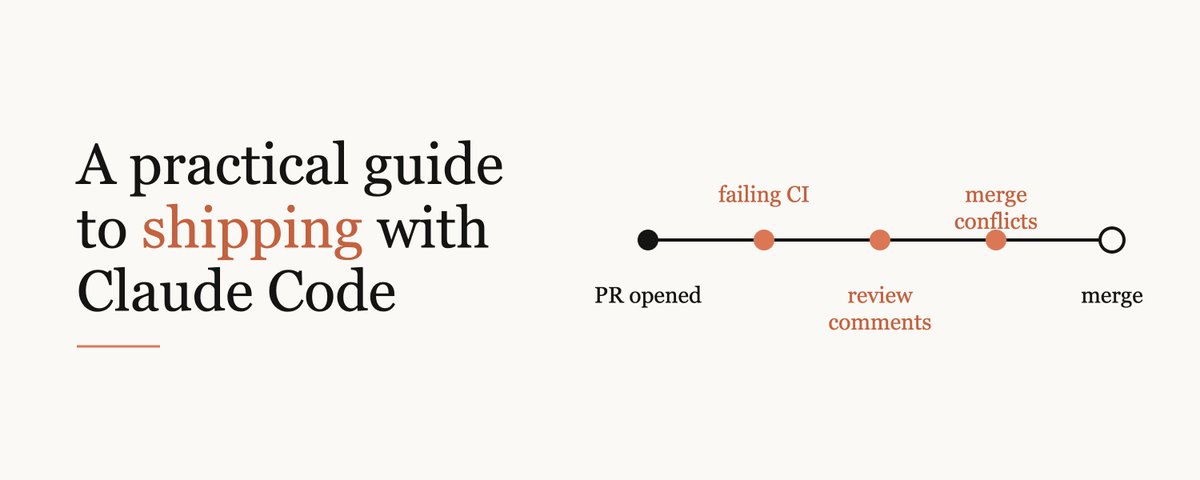
When you open a pull request, there’s usually a bunch of follow-up work to be done:
CI fails
A review comes back with six comments
A main merge creates a conflict
They’re all tiny little tasks, but each one takes you off your focus work.
On our team an agent commonly does this follow-up work. For example, it can pick up an issue a reviewer found, so when the author gets back, the PR has already been updated once.
In my experience this is a more productive and enjoyable way to code. It minimizes context switching and keeps me in a flow state.
We’ve talked about the process the Claude Code team uses for code review here (opens in new tab), and about the verification process underneath it here (opens in new tab).

Claude Ship is for a developer or tech lead whose team works on GitHub and who doesn’t have admin privileges. You can start on your own right now by running a few commands, and save what you learn to files in your repo for the team to review. Admins only need to get involved if your team wants agents doing this automatically on the team’s PRs.
You’re still the architect of the process, so you’re defining what to build, how to build it, and what the bar for merging is.

The post-PR process
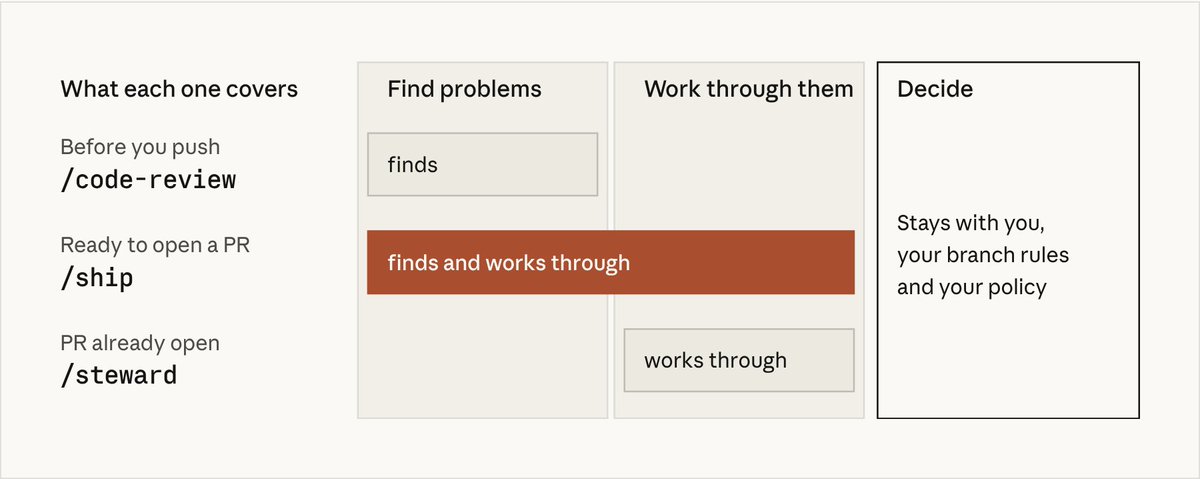
After you’ve opened a PR, you want to find issues, address issues, and make a final decision on if the change can be merged.
Claude Ship is three agents that tackle this work: Code Review, PR Steward (beta), and Claude Approvals (beta).
Code Review does an in-depth review of pull requests against the codebase through multiple lenses. It collects findings, adversarially verifies them, categorizes them and posts them to a PR.

PR Steward works to keep a PR green, but is designed not to approve or merge pull requests. It jumps in on failing CI checks, merge conflicts and review feedback from Code Review, other review tools, or team members. After every push, it comments with what it changed and how to undo it.

From there, Claude Approvals applies an approval policy that the team writes as a file in the repository. Claude can approve routine changes on its own if the policy allows it, or can require deeper human sign-off for certain scenarios. It works like a smarter CODEOWNERS file. Teams can have Claude Approvals consider a variety of signals in its decision-making process, including Code Review findings or their own classifiers.

Code Review is generally available, and the other two are in beta. /ship is a command you run yourself in Claude Code to try Claude Ship on your own pull requests. It comes with the latest version of Claude Code, and it works even before an admin has turned on any of the agents.
You can partially automate the first two steps today. The last step is a decision that you set in your branch protections and (if your team adopts one) your policy file. Here is how it breaks down using the three agents that are part of Claude Ship:


On your own PRs
Getting started today with /code-review
If you only do one thing from this post, review your branch before you push it. Any bugs you catch at this point are less likely to come back later as review comments or failed checks that pull you off of your next task. At the Claude Code prompt, enter this command:
It reviews the commits on your branch and your uncommitted changes for correctness bugs. A few variations to keep in mind:
The effort range goes from low to max, with low returning only the findings the review is most sure about and higher levels giving you a broader set (including some it’s less sure about). The command remembers your last effort, so enter a new one if the risk level changes.
A few caveats:
You will want to take extra care when using the ultra setting, which runs in the cloud, needs a login at claude.ai, and can be billed separately from your plan. Read the ultrareview docs (opens in new tab) before trying it.
Edits made by –fix during a background review may not be caught by /rewind. Commit first if you want an easy way back.
Local /code-review reads your CLAUDE.md files, but not REVIEW.md. This matters later.
The first thing you should do is run /code-review a few times to understand what it catches and where it gets things wrong. You’ll use this later.
Run /ship for your next PR
Once you’re ready, type:
If you don’t have a PR for your branch yet, /ship will:
Commit your pending changes. It behaves as if you had run git add -A, so it will respect your .gitignore. It will create a branch if necessary, and it will use your session to write the commit message. You will be notified of this before the commit, and can abort by hitting Esc.
Push and create the PR as you.
Perform a code review using /code-review, unless the commit has already been reviewed by Code Review. If the code review reports any issues, it will fix the ones it judges as valid for you.
Watch the PR for up to seven days. It will work on failing checks, conflicts, and review comments, and will exit if the PR is merged or closed.
The first step, where /ship commits your pending changes as if you had run git add -A, sometimes catches people by surprise, so be sure to run git status before running /ship.
The command will not commit changes that touch files with names that look like secrets, or files that set rules, like CLAUDE.md, REVIEW.md, or anything in the .claude/ or .github/ directories. You will need to make these commits manually beforehand.
Also, if you are working in a public repository, the command will not commit any changes for you. You will need to commit any pending changes manually before you can proceed, and if the PR already exists, it won’t include your pending changes.
Optional: specifying effort level, PR, or bot
The command will by default read comments by you, people with write access, and the Claude GitHub App. You can specify additional bots in the form +name. If that bot comments, it will be treated as an assertion to check against the code.

Letting Claude watch the PR
Claude watches the PR as you, on your machine, and uses your quota. Closing your laptop stops it, so keep the session open and the machine awake. You’ll also need to be logged in to the GitHub CLI (run gh auth login first), and it only watches a PR that you opened.
For anything other than auto mode (opens in new tab), the watch (opens in new tab) stops at every prompt and requires your response. It won’t watch in bypass-permissions mode. Note that on Windows, /ship opens the PR and reviews, but the watch doesn’t start.
Ensure that the watch has its own checkout. You need to leave the branch checked out. If you’re just going to jump straight into your next task, then make sure to use a separate worktree for one of them.
If the watch fails to start, Claude will explain why but still review the PR. For example, you can’t run a watch if you have a PreToolUse or PermissionRequest hook on Bash in the .claude/settings.json of your repo.
Additionally, the watch uses up model turns while you’re away, so it counts against your plan usage or API bill. The first time you use it, it’s a good idea to be near your machine to make sure usage is within your expectations.
Only run the watch on repos you trust
The watch will merge the base branch into yours when necessary and then run commands like your tests. In other words, anyone who has the ability to land changes on the base branch has the ability to run commands on your machine during the watch. Only run the watch locally on a repo where you trust everyone who can land changes on the base branch.
Claude is told never to merge the PR, and Claude Code also constrains the gh and git commands it can run during an unattended turn, preventing direct merging or force-pushing. The watch’s own commits also leave out the files that set the rules: .github/, CODEOWNERS, CLAUDE.md, .claude/, git hooks, etc.
However, this doesn’t protect against all vectors. For example, the test script also runs under your credentials, and if you type a message during a turn, that will allow the constraints to be lifted for that turn. Additionally, if auto-merge is enabled, a fix from the watch could end up being what allows GitHub to merge.
Furthermore, the commits and pushes made by Claude during the watch are not affected by git hooks in your repo, so make sure any checks that need to be present are added to CI and branch rules.
For the full terms of the watch, run /ship terms in the product before your first time using it.
/steward for existing PRs
Many PRs don’t need another review, but need someone to see them through to merge. If you have such a PR, check out the branch and run:
It will run just the watch component of /ship. It will watch the PR you opened and work on things like failing checks, conflicts, and comments, without reviewing it first.
If you don’t specify a PR number, it will watch the PR for the current branch. It will take the same +name bots, and the same caveats as before apply.
However, if a PR is already labeled Steward, it will not run the local watch. And if it is unable to run a watch, /steward will not do anything.
If you want to stop the watch, you can use either /steward stop or /ship stop. Since a session can only run one watch at a time, starting a new one will terminate the previous one.
Don’t confuse /steward with PR Steward, which is a team service that runs as claude[bot] after being enabled by an admin. The /steward command runs as you, in your session.
A PR that has red checks is a good place to start. A PR that gets stuck in a conflict loop is also a good candidate. On the flip side, a PR that’s in the middle of a design debate is a bad one because that’s your debate to settle.
Claude escalates bigger calls to you
As part of the watch, Claude is told to make small changes and elevate the bigger ones. Things like:
A request to redesign something, like a new API or a bigger scope
A security issue it wasn’t able to resolve
It also pushes at most 3 times for a given issue, and then reports the attempted solutions.
That’s roughly equivalent to our claim in the verification blog post (opens in new tab): if we keep running the same check and it keeps failing after three rounds, then the approach is probably wrong.
At this point, it escalates to the author of the code.

In your repo
As you get a few PRs under your belt, you’ll start to notice patterns. For instance:
The same comment from the same reviewer
A setup instruction that Claude has to figure out
A flaky check
You can start to write these down for your team, in one of a few files, depending on which tool needs to read it:


Repeat comments become review rules
Let’s say you get asked by a peer twice to make sure a new query contains a tenant check. If you use local review, you can write this down in CLAUDE.md, since /ship uses /code-review to review. And if you have Code Review on your repository, the review-only rules can go in the root REVIEW.md:
Code Review won’t read the REVIEW.md file from the PR being reviewed. It will also only respect some instructions, like excluding paths and limiting nits, when the default branch is protected.
Not every comment should be elevated. On our team, we have a principle that a pattern has to be repeated on at least 2 PRs to be considered for a rule. A person then approves the PR that adds the rule. That’s a good bar to adopt. You should also be deleting rules as needed.
Repeat setup becomes verify skills
If you find yourself constantly telling Claude how to boot up the app and navigate to specific pages, you should just write it down. Create .claude/skills/verify/SKILL.md. This can be in the root or in the directory of the code.
1. Start the stack with npm run dev:stack.
2. Wait for /healthz on port 3000 to return 200.
3. Sign in with the seeded test account.
4. Exercise the changed flow in the browser and take a screenshot.
5. Report the steps you ran and what you saw. Don’t report success without them.
Be sure to customize the commands.
Have Claude run it a few times, and fix any flaky behaviors. People ignore verification they don’t trust.
Repeat PR maintenance becomes steward rules
This one can be easy to miss. The local watch reads the .claude/skills/steward/SKILL.md file from your working directory, whereas PR Steward, which runs in Anthropic’s cloud, reads it from the default branch. Here’s an example:
- Regenerate the lockfile with npm install; don’t edit it by hand.
- `e2e-nightly` is flaky. Re-run it once before looking for a cause.
- Run npm test and npm run lint before pushing a fix.
- Leave comments about API design to the author.
In that example, the two settings at the top keep it out of the / menu and out of the skills that Claude picks on its own.
The steward file can’t change the watch’s restrictions. However, anyone who can merge to the repository can edit the file, so review changes to it as carefully as you would review any changes to CI.
If your team turns on PR Steward later, those guidelines will apply in Anthropic’s cloud once they’re on the default branch.
Across your team’s PRs
Standardizing the post-PR process
Once you’ve run /ship on a few of your own PRs, you’ll have a good sense of what Claude Ship could do across your team’s PRs. The rest of this post is for when you have that conversation with your admins, so it covers what you should ask them for, and how to roll it out safely.
To get started (opens in new tab), you’ll need to ask your administrators for a single repository, a few volunteers, and a limited amount of time to test Claude Ship on your own pull requests.
Agree on your budget constraints ahead of time.
Protect the default branch of the repository. A repository admin can set up this requirement, ensuring that any updates require a PR with an approval on the latest push, and that the Claude GitHub App is not on the bypass list.
Enable Code Review for this repository. An Owner, the admin role in your Claude organization, can enable Code Review.
Enable PR Steward in Manual mode. The same Owner can enable PR Steward to kick in when a user with write access comments @claude steward, or when authors opt in for it to kick in automatically. Comment @claude stop to stop Steward.
Create an observe mode approval policy. This file acts like any other file; you can create it in your own PR, but since merging this file enables Approvals for the repository, clear it with an Owner first.
PR Steward is designed not to approve or merge pull requests, so make sure you use branch protection to require the approvals you want before merging.
PR Steward reads the comments from reviewers and performs some actions based on them. Like any text-parsing agent, it can be fooled by what people say. Make sure you use it only in repositories with trusted collaborators, and check the changes made by PR Steward on comments from untrusted users.
Configure your first approval policy
For approval policies, Claude Approvals reads from the .claude/approvals.yml file on the default branch. A simple first policy could be:
seats is the number of people who have to approve, and the author can take one of those seats.
There’s one catch here, which is that after the watch has merged the base branch, the most recent commit will be a merge commit, and nobody sits in the author’s seat for it. So the PR author should comment @claude approve.
When a rule’s verdict is claude: comments, Claude won’t approve. If more than one rule matches, the strictest one wins. In observe mode, the check will print the outcome but not approve.
Make sure to keep the advisory line. Once the policy file is on the default branch, Code Review will only start automatically on PRs that match a rule that names it, so without that line your automatic reviews stop. Advisory reviews don’t affect the verdict, and they run according to your existing settings. A policy that names Code Review can start billed reviews, even where Code Review is turned off.
To see where a passing Claude review could lower what a path needs, you can swap the advisory line for an override and update the rule’s purpose to match (for example, “When Claude’s review passes, one is enough and Claude approves.”).
Because the override also names Code Review, automatic review will still be triggered for those pull requests. When the review passes, the override takes the rule’s decision and replaces it with one seat plus Claude’s approval. The author can fill that one seat, so the check can now report that Claude would have approved. But text in a pull request can sway Claude’s review, and when it does, this override lowers what that pull request needs.
If there are some paths that need to always require a human, put them in a rule without an override (next section, step 1). Tell the budget owner before you merge this, as a policy configured like this will start billed Code Reviews, even in observe mode, whenever you push, regardless of your Code Review settings.
You can also build your own classifiers for questions like “is this PR related to a migration?” Custom classifiers (opens in new tab) live in .claude/classifiers/<name>/def.yml on the default branch, and each run is billed, even in observe mode. Start out by focusing on paths and the Code Review result.
Monitoring and transitioning to enforcement
Our team uses the same process as observe mode for our own internal commit gate. It logs the decisions it would have made in observe mode, so we can analyze false positives before making them mandatory. You will see the decisions in the Claude Approvals check and the associated comment.
Keep in mind that you only get the value of observe mode if you actually monitor it. After a week or two of having it in place, revisit the merged PRs and see how the decisions compare to your reviewers’ behavior.
The first two rows apply once you’ve added the override.


Go through a few example PRs. How would you have decided? Which rule made the decision? What would you change? Pay the most attention to the second row, and fix those before you relax any rules.
One thing to know before you enforce: Claude’s approvals count as real approvals on GitHub. If a ruleset only needs one approval, Claude’s can be enough on its own. So read your policy and your branch rules together.
If you use auto-merge, and have policies that only the author can fulfill (like the override above), you can have PRs that get merged without anyone doing anything. Decide explicitly whether that’s OK for each path, and write it down.
Then lock it down in this order:
Use a rule without an if or override for paths where you always need a second set of eyes. No classifier result can override it, and nested: inherit carries it into subdirectories that have their own policies.
Remove mode: observe and merge. Now Claude can approve wherever the rules say it approves.
About five minutes later, comment @claude approvals rerun on open PRs, so any stale results get cleaned up. Reruns can charge for classifiers again.
Ask a repository admin to make the Claude Approvals check required, and to pick the Claude app as its source. Until then, your PR can get merged regardless of what the check says.
Claude Ship and the local commands use AI, and they can miss bugs, security problems, and other issues, so keep all your existing tests, scanners, and reviewers.
Things to try this week
I’d like to make it clear that for the Claude Code team, the person who called the agent is responsible for a change. It’s as if they typed it themselves.
Your team should still be responsible for the PR scope, design, evidence, and rules for when it can merge. With these principles in mind, here is where you can get started:
Today: Run /code-review on your current branch. Make a note of what it got wrong and what it missed.
Next PR: In a repository where you trust everyone who can merge, try /ship, and stick around. Try /steward on an existing PR, in a different terminal and git checkout.
By Friday: Create a small PR with the rule you repeated most, in your CLAUDE.md, REVIEW.md, or a skill. Do the commit yourself, since /ship will not commit rule files. Share the PR and the example observe-mode policy with your team.
If you do so, I would love to know which rule file was most impactful, and which tasks you chose to keep doing yourself.

-
Claude Ship splits post-PR work across Code Review, which performs multi-lens review and adversarially verifies findings; PR Steward, which handles failing checks, conflicts and review feedback but does not approve or merge; and Claude Approvals, which applies a repository policy to approve routine changes or require human sign-off. Code Review is generally available, the other agents are in beta, and
/shipis available in the latest Claude Code without admin enablement. -
Run
/code-reviewbefore pushing: it checks branch commits and uncommitted changes for correctness bugs; lower effort prioritizes higher-confidence findings, while higher effort returns a broader, less-certain set. Try it repeatedly to learn what it catches and misses. With/ship, pending changes may be committed as though you rangit add -A, then the command can push/create the PR, review and fix findings it judges valid, and watch the PR for up to seven days; checkgit statusfirst, and commit pending changes yourself in public repositories. The local watch uses your machine and quota, stops if your laptop closes, and should only run in repositories where you trust people who can land changes on the base branch, since commands run under your credentials. -
Turn recurring friction into repo guidance: consider making a review rule only after a pattern appears on at least two PRs, have a person approve the rule change, and remove outdated rules. Use
CLAUDE.mdfor local review guidance and rootREVIEW.mdfor Code Review rules. For repeated app setup, create.claude/skills/verify/SKILL.mdwith customized, explicit steps (start the stack, check health, sign in, exercise the changed flow, and report observed results); run it repeatedly and fix flaky steps so the verification remains trustworthy.