We can't find the internet
Attempting to reconnect
Something went wrong!
Hang in there while we get back on track
🔥 TOP SIGNAL
Theo’s T3 Code performance postmortem is a useful boundary for agentic debugging: a vague Codex request produced a confident diagnosis and a 10,000+ line PR that changed nothing. The breakthrough was to stop asking for a fix and have the agent build a console-driven toggle harness; testing the hypotheses isolated an infinite sidebar opacity animation. The human supplied the hypotheses and validation—the agents were valuable as fast codebase searchers and diagnostic-tool builders, not autonomous diagnosticians.
⚡ TRY THIS
Turn bug reports into experiments. Isolate the target in a one-tab browser and use Task Manager: Theo notes that browser tooling is weak for CSS/compositor work, while DevTools changes performance characteristics. Ask the agent to build a console-pasteable toggle for suspected effects, apply all, reset, then flip one feature at a time; separate transitions from animations before editing. Theo got the GPU process down to 3% or less with the toggles applied, back above 25% after reset, and eventually traced the worst offender to the sidebar terminal icon’s pulse.
Put a conductor over the fleet. Kent C. Dodds’ pattern is one supervisor spawning isolated Cursor Cloud Agents, using the Kody Koala MCP for handoffs, creating a PR when a worker stalls, receiving completion messages, and sending a Discord summary at the end. Make each worker’s environment, handoff state, and completion message explicit; the control plane is more valuable than another giant prompt.
Use near-free models as sidecars. Theo says Luna became effectively free after an 80% cost reduction and is using it for T3 Code title generation; he wants it on every prompt for descriptions, feedback, and statuses. Route low-risk metadata and auxiliary outputs there, but measure whether the extra calls improve the workflow before letting cheap inference become unbounded background work.
Normalize shared skills with a compatibility shim. DHH reports that Claude Code still does not natively scan
~/.agents/skills; his workaround is a symlink, despite the Claude docs acknowledging the pattern. Keep skills in one canonical tree, symlink where needed, and add a fresh-machine discovery check to your agent setup.
📡 WHAT SHIPPED
LLM 0.32: Simon Willison’s major CLI/library release sends reasoning traces to stderr (
-R/--hide-reasoningsuppresses them), adds the GPT-5.6 family with GPT-5.6 Luna as the default, and supports server-side Code Interpreter, WebSearch, WebFetch, CodeExecution, and MCP tools. The newllm openai endpointcommand can run one-off prompts against any OpenAI-compatible endpoint—including a local LM Studio model—without logging them. It also adds typedstream_events()for mixed reasoning/text/tool outputs and tool-chain pause/resume from stored history: primitives worth copying into any coding-agent loop that needs human gates and durable state.OpenWiki 0.3: A full codebase-wiki prompt rewrite reports a 28.57% relative success increase (35% → 45% at
n=2), 14% fewer tokens, and 26% fewer tool calls per successful task. Install withnpm install -g openwiki@0.3.0; treat the numbers as an early, self-reported signal and rerun the eval on your own repositories.Model routers are becoming a coding-agent layer. Not Diamond Code announced routing across gateways and harnesses, including Claude Code, claiming 20–65% lower cost without a quality hit. Mckay Wrigley sees the larger opportunity in blending “jagged” models into smoother behavior, describes router engineering as a third layer after model and harness engineering, and says DeepSeek V4 Flash was cheap enough to offload roughly a half-dozen tasks from his Fable 5 workflow. The cost claim is vendor-reported; the actionable test is per-task routing and blending, not headline token price.
Resilience and fallback primitives: LangChain says Deep Agents, LangGraph, and LangChain can retry interrupted work, follow a safe recovery path, resume from saved state, and fall back to alternate models. Its Gateway announcement adds fallback rules across models and hosts when a provider fails or rate-limits. This is the right production direction: recovery should be part of the agent runtime, not a human restarting a dead run.
🎬 GO DEEPER
- Video — Theo’s T3 Code performance postmortem. Focus on the diagnostic-harness segment: the agent becomes useful when the engineer turns competing theories into measurable toggles, then the video explains why infinite compositor animations and layered effects kept the page busy.
Repo — OpenWiki. Study the prompt rewrite as an example of improving an agent by changing its codebase-understanding instructions rather than swapping models; reproduce the success, token, and tool-call measurements before trusting the tiny
n=2sample.Agent framework — llm-coding-agent. LLM 0.32’s lower-level work was driven by Datasette Agent and llm-coding-agent; inspect the combination of model/tool mixing, structured streaming, human approval, and resume-from-history rather than treating an agent as a single prompt wrapper.
Editorial take: The frontier is shifting from prompt quality to control-plane quality: humans design the measurement, agents build the probes and patches, and supervisors carry state between workers.
Theo (t3.gg, creator/maintainer of T3 Code — his open-source alternative to the Codex app with ~120,000 users) recounts a firsthand debugging story: T3 Code's browser GPU process was eating 13–15% CPU at 720p and up to ~50% at full resolution on a 5K display, and it took him ~1.5 days plus two nights until 5am to fix .
- Why the agents failed at first: Giving the Codex agent a vague problem description produced a plausible diagnosis and a 10,000+ line PR rewriting the network/React update layer — which changed nothing . Codex, Sol, and Fable all fixated on wrong suspects (the "Ultrathink" composer gradient, a UI that only renders when Claude Code's ultrathink mode is active and wasn't even in use; a loading skeleton), and Chrome's AI-generated performance summary blamed the same unrelated features .
- The workflow that worked (replicable): stop asking the agent to solve the problem; ask it to build a bisection harness instead. Theo had the agent create a window-bound function (
_t3gpu) that injects custom CSS into the production page, letting him toggle suspicious features (animations, filters, shadows, composer blur, media layers, noise layer) live from the console . Toggling everything off dropped the GPU process from 20%+ to ≤3%; resetting it spiked usage back . A second agent then generated a script to enumerate and pause all animations and split transitions vs. animations to isolate the culprit . - Root cause: a pulsing terminal icon in the sidebar — an infinite opacity animation. Each infinite compositor animation promotes its element to its own GPU layer and keeps the compositor committing at the display refresh rate (120fps on his high-DPI display), so several small sidebar layers get recomposited forever even when nothing else changes . Backdrop blur plus a very low-opacity noise layer over the page amplified the cost . The shipped fix removed the noise layer, retuned gray colors, and made animations finite or static .
- Measurement caveat: Chrome DevTools itself changes site performance characteristics (debug-mode overhead), so Theo trusted the browser Task Manager over profilers, which become near-useless once work is offloaded to the CSS/compositor layer .
- Surprising datapoint: an empty, idle Claude AI tab used ~10% of his laptop's GPU per open tab — three open Claude tabs masked his fix — and Claude's suggestions for the animation fix were (in his words) bad enough that he rejected them all, including a proposal to remove pulsing entirely rather than make it finite . He built T3 Code partly because the Codex desktop app repeatedly regressed performance across updates .
- Multi-agent pattern: Theo ran Sol-based and Fable-based agents simultaneously on two separate machines over T3 Code, deliberately isolated so they wouldn't interfere or get confused by each other's in-progress solutions .
- Timeless takeaway: the agents couldn't diagnose or fix this — the human still brought the real information — but they were genuinely valuable as fast codebase searchers and as builders of custom diagnostic tools for the human's theories; diagnosis by hand would have taken far longer .
- Related product news: T3 Connect (connecting agents to T3 Code without needing Tailscale) is coming soon .
Geoffrey Huntley, writing from experience at Canva, argues LLMs generate better code than most companies can hire at a price cheaper than a human — but outsourcing thinking is an "engineering crime" . He frames LLMs as a "time compression device": deciding what to build, and delivery (working software and product experiences that create value, not generating code), remain the hard parts .
At Canva, he observed that LLMs reward experience, yet experienced engineers "BFFs with IntelliJ and their favourite keyboard" were being left behind by "wild-brave-fresh-eyed juniors" — which he calls dangerous . A chart on ghuntley.com/screwed/ (Feb 2025) makes the underlying point: the more experience and domain knowledge, the better you can drive LLMs .
Resources linked in the thread: The Register's special feature on the "Ralph Wiggum loop" — prompting Claude to vibe-clone software — at https://www.theregister.com/special-features/2026/01/27/ralph-wiggum-loop-prompts-claude-to-vibe-clone-software/4211889, plus ghuntley.com/redlining ; and his take that software engineers are "clowns as a profession" versus engineering fields that require professional liability (ghuntley.com/squirrel-burgers/) .
Simon Willison released LLM 0.32, calling it the most significant version since launch; it ships GPT-5.6 family support with GPT-5.6 Luna as the new default model, and he says the project is becoming "very agent-shaped" — powering Datasette Agent and llm-coding-agent.
-
Reasoning traces from reasoning models now go to stderr, keeping stdout clean for piping; use
-R/--hide-reasoningto suppress. -
Server-side tools:
llm --tool CodeInterpreter 'Show current python and SQLite versions'uses OpenAI's code execution environment; WebSearch is also available. llm-anthropic 0.26 adds WebSearch, WebFetch, CodeExecution, and AnthropicMCP — e.g.llm -m claude-sonnet-5 -T 'AnthropicMCP("https://datasette.simonwillison.net/-/mcp")' 'how many rows in the blog_blogmark table?'runs MCP tools inside one request/response. -
New
llm openai endpointruns one-off prompts against any OpenAI-compatible endpoint (not logged) — e.g. local LM Studio Gemma 4 12B with a QuickJS tool:uvx --with llm-tools-quickjs llm openai endpoint http://localhost:1234/v1 -m google/gemma-4-12b -T QuickJS 'Use QuickJS to multiply 3434 * 2434' --td, no LLM install needed. -
Python API:
model.prompt(messages=[system(...), user(...), assistant(...)])sends full history in one call, andstream_events()yields typed events (reasoning/text/other) for mixed reasoning+tool+image outputs. -
New
llm-chat-completions-serverplugin exposes an OpenAI-compatible v1 endpoint (llm install llm-chat-completions-server && llm chat-completions-server --port 9000), consumable viallm openai endpoint. Logging got a Git-like content-addressable message store to avoid duplicating history JSON;llm logs/llm logs --jsonstill work. - Agent-loop primitives: tool chains can pause for human approval and resume from stored history — added for Datasette Agent; Willison now defines an agent as "runs tools in a loop to achieve a goal". Existing model plugins must be upgraded to 0.32 for the new streaming events.
An X post by @reach_vb says most of OpenAI's Developer Experience team is meeting this week to plan, build, and think about what to do better for developers, inviting feedback on what to build and what's missing . Simon Willison replied with a concrete ask: "Ship OAuth so I can build LLM features for my web apps that get billed to my user's existing OpenAI accounts" — a request for user-owned-account billing that would let developers ship LLM features without fronting API costs.
@SocketSecurity reports an active npm worm still spreading: 2,234 affected package artifacts across 444 unique packages, with average detection time of 5 min and 18 seconds after publication; their campaign page lists affected packages/versions . @bentossell amplified the update with "phew (i hope)" .
Luna cheap after 80% cost cut, used as always-on auxiliary model in T3 Code — @theo says Luna is "basically free" after an 80% cost reduction and can handle "real data processing type work"; he's overhauling T3 Code's title generation to use it and wants to spin it up on every prompt for descriptions, feedback, and statuses . Practical pattern: when a model becomes near-free, attach it to every prompt for cheap auxiliary outputs.
Tool-call visibility debate — In the thread, @maria_rcks wanted Luna specifically for tool-call summaries ; @theo argued people don't need to actually read tool calls anymore ; @swyx countered that tool calls should still be shown as audit functionality and exported, linking a session portability post (https://earendil.com/posts/session-portability/) . Timeless pattern: keep agent tool calls as an auditable, exportable log even if the UI de-emphasizes them.
Kent C. Dodds (@kentcdodds), developer and educator, takes a contrarian stance on agent-generated tests: "Your agent writes bad tests and you yell at it. My agent writes bad tests and I let it do it anyway. We are not the same" — he accepts imperfect test output from his coding agent rather than pushing back on it . A reply from him links a YouTube video (https://youtube.com/watch?v=5C0jTimK8V0&list=PLV5CVI1eNcJhP4nrJt85L7PxHjebFpDfY) asking viewers to watch, comment, subscribe, and share .
- @theo says Luna is "such an insane value" after an 80% cost reduction — "basically free" and capable of "a ton of real data processing type work." He's overhauling title generation in T3 Code to lean on it and wants to spin it up on every prompt to generate descriptions, feedback, and statuses .
- @swyx observes that "good enough" intelligence is now "too cheap to meter," which is why ontologies and graph knowledge are finally trending; the hardest part of knowledge graphs has become cheap, so complements are increasing in value. He links this to @theo's Luna post .
Guest author Shlok — known for teardowns of AI-lab memory systems — unpacks OpenAI's ChatGPT Work (launched July 9, 2026) from hands-on probing with Codex, with linked conversation logs throughout .
What Work is: an agent for knowledge work that runs on the Codex harness and lives in a persistent cloud microVM — Pro gets 8 CPUs/20GB RAM/64GB disk, Plus 14GB RAM — plus a managed Chrome service; it outputs Sheets/Docs/Slides and hosted Sites . Desktop Work has cloud and local modes; local mode is "essentially Codex, minus the code-related UI traces", and local tasks don't sync to web/mobile with no migration path yet .
Persistence architecture: the workspace syncs to persistent storage and is restored onto isolated microVMs; each thread gets a /workspace/scratch directory with full OS freedom (folders, dependencies, scripts, databases). Cross-thread continuity runs through the ChatGPT product layer: compressed summaries of recent tasks/files, a Personal Context tool that queries Chat and Work history, and a Library for files that lives off the computer and does not sync with thread-local copies. An agent can browse other tasks' scratch dirs only when explicitly instructed, and won't do it on its own . There is no meta-layer agent coordinating between tasks yet — some users already run Codex that way .
Proactivity & scheduling: new conversations surface personalized suggested tasks generated asynchronously from calendar/Gmail/memory, injecting a pre-authored prompt; nothing runs until the user executes . Scheduled tasks come in two forms: standalone (saved prompt, fresh task per run) and heartbeat tasks inside an existing conversation that reawaken it with context intact — heartbeats are desktop-only for now; triggers can be exact time, a loose window like "in the morning", or a monitored condition .
Browser use: Work drives a separately hosted Chrome via tool calls, with a persistent profile (logins/preferences carry across tasks) and a synced permission ledger; users can take over the live browser on web/desktop, not mobile. Datacenter-browser constraints: Amazon US rejected it as an unsupported session, Google Photos timed out, and CAPTCHAs require explicit permission — no fingerprint rotation or evasion; the same tasks worked in local mode .
Plugins/skills/tools: a plugin bundles apps (mostly MCP-server tools), skills (instructions + references/templates/scripts), and app templates; three types: operational (Computer Use, Sites, Documents), role-specific (e.g., Sales plugin teaches 20 skills across 29 apps), and service (Gmail, Slack, Notion, Figma, Salesforce, PitchBook). The Plugin Directory holds 1,000+ plugins but discovery is weak — Work ignored available travel plugins for flights/hotels in favor of web search, even when Expedia was named .
Scale/trajectory: Work + Codex reportedly crossed 10M users three weeks in; Greg Brockman confirmed Chat and Work will merge by end of 2026 .
Simon Willison (@simonw) announced a major new release of LLM, his CLI tool and Python library for talking to hundreds of different LLMs, adding reasoning traces, OpenAI Responses support, server-side tools, and smarter logging . Detailed write-up: https://simonwillison.net/2026/Aug/4/new-release-of-llm/
@kentcdodds built an automated Sentry-to-fix loop: a Sentry webhook sends errors to Kody Koala, which then kicks off a Cursor cloud agent to investigate and fix the error; if the fix is low risk, the agent merges, deploys, and verifies in production . He called this 'loop engineering' and later called it 'by far my favorite loop' . The description is firsthand but high-level — no setup steps, prompts, or configuration details were shared.
Kent C. Dodds (@kentcdodds) accidentally started a Cursor cloud agent in the wrong repo; instead of giving up, the agent used Kody Koala (@kodykoala) to spin up a separate agent in the right repo and monitored its process for him.
- @tomas_hk announced Not Diamond Code, an intelligent model router for long-horizon coding agents. It works with any gateway or harness, including Claude Code, selecting the best model and reasoning effort for each step, and claims to reduce costs by 20-65% without impacting quality .
- Mckay Wrigley (@mckaywrigley) is "bullish" on routers: same performance at lower cost is "obvious," but the bigger opportunity is blending multiple "jagged" models into "smoother" intelligence — "the era of model melding begins" . He frames the evolving stack as "model engineering -> harness engineering -> router engineering," a third new layer for increasing intelligence, and predicts "surprisingly robust gains" here .
-
Firsthand, Wrigley tested
deepseek v4 flashlast night — "basically free" — and found "a half dozen things" it handles well enough to offload from his "fable 5 workflow" . - Link: https://x.com/tomas_hk/status/2084669945150062619
- Mario Zechner (@badlogicgames) observes that "everybody is building chatboxes with connectors now," linking to a Cursor AI post — a critical take that the industry is converging on the same chat+connector pattern for agents .
- Riley Brown (@rileybrown) frames this evolution as "Agent Chat + Connections + Browser + Automations = Superapps," suggesting these components combine into superapp-like agent experiences .
Kent C. Dodds (@kentcdodds) describes a 'conductor' agentic orchestration system he built: one conductor agent spawns individual Cloud Agents (via the Cursor Cloud API), each with its own environment, and shepherds them to get changes into production; communication flows through the Kody Koala MCP . The conductor replaces him in babysitting the other agents; each agent can itself orchestrate sub-agents . Worked example: when an agent struggled to open a PR, the conductor used Kody to create the PR and messaged the agent that its PR was ready for review . Sub-agents report completion back to the conductor via Kody . When the run finishes, the conductor sends him a Discord summary of everything that happened .
Geoff Huntley (@GeoffreyHuntley) reports being on day 2 of using ssh_exe_dev (by @davidcrawshaw) as his full-time, day-to-day “ephemeral experiment driver,” and credits Crawshaw's product execution and taste .
Firsthand complaint: @kimmonismus is canceling Claude, citing a recurring failure in his email agent workflow (Claude checks inbox for important emails, summarizes, works with them, and sends replies when necessary): Claude repeatedly doesn't read the email thread to the end and ignores the latest emails; when challenged, Opus 5 admitted, "Valid point. I didn't read it." @theo replied with partial agreement ("Yes but also…") and praise for Fable: "fable is so good."
OpenWiki v0.3 (npm install -g openwiki@0.3.0) is out with a full prompt rewrite aimed at generating more detailed and accurate wikis . In a firsthand update, @BraceSproul reports eval results at n=2: 28.57% success increase (35% → 45%), 14% fewer tokens, and 26% fewer tool calls per successful task, with wikis containing much more data . LangChain amplified the release, calling the upgraded init prompt higher-quality and more codebase coverage . Repo: https://github.com/langchain-ai/openwiki.
Firsthand (Theo/t3.gg): Luna is "insane value" after an 80% cost reduction — "basically free" and useful for "a ton of real data processing type work" . He is overhauling title generation in T3 Code to take more advantage of it, and wants to run it on every prompt to generate descriptions, feedback, and statuses since it's basically free . In reply context, @maria_rcks wanted to use Luna for tool-call summaries ; Theo's take: people don't need to actually read the tool calls anymore — suggesting cheap generated summaries/statuses can replace manually reading raw agent tool traces.
LangChain announced model fallbacks in LangSmith LLM Gateway: define fallback rules across models and hosts, used across every agent; when a provider goes down or rate-limits, calls route to another model, so outages don't take agents down . Details at https://www.langchain.com/blog/langsmith-llm-gateway-runtime-controls-for-production-agents.
Unpacking ChatGPT Work: the Agent for a Billion Users
Editor’s note: I’m excited to welcome Shlok (opens in new tab) to our guest post roster (opens in new tab)! You may know Shlok from his excellent explorations (as an outsider — for an insider perspective see our podcast with OpenAI’s Akshay Nathan (opens in new tab). Already one of our most popular episodes of the year!) of leading AI Lab memory systems (opens in new tab), which he gave an excellent AIE talk on (opens in new tab). We’ve been covering OpenAI’s research and deployment of agents to all of humanity since Plugins 2023 (opens in new tab) and Devday 2024 (opens in new tab) and Codex 2025 (opens in new tab), and now ChatGPT Work in 2026 seems the penultimate stage of the long journey. Let’s dive in!
On July 9th, OpenAI released ChatGPT Work (opens in new tab), their agent product for knowledge work. It was, by any measure, a busy launch: three new models (opens in new tab) across fourteen configurations (opens in new tab), a consolidation of the ChatGPT and Codex desktop apps, and cloud agents brought to the mainstream (opens in new tab) in their most accessible form yet.
Three weeks in, Work (along with Codex) has reportedly crossed 10 million users (opens in new tab).
Editor’s note: ChatGPT estimated to cross 1B MAU in June (opens in new tab) and 1B WAU this month (opens in new tab).
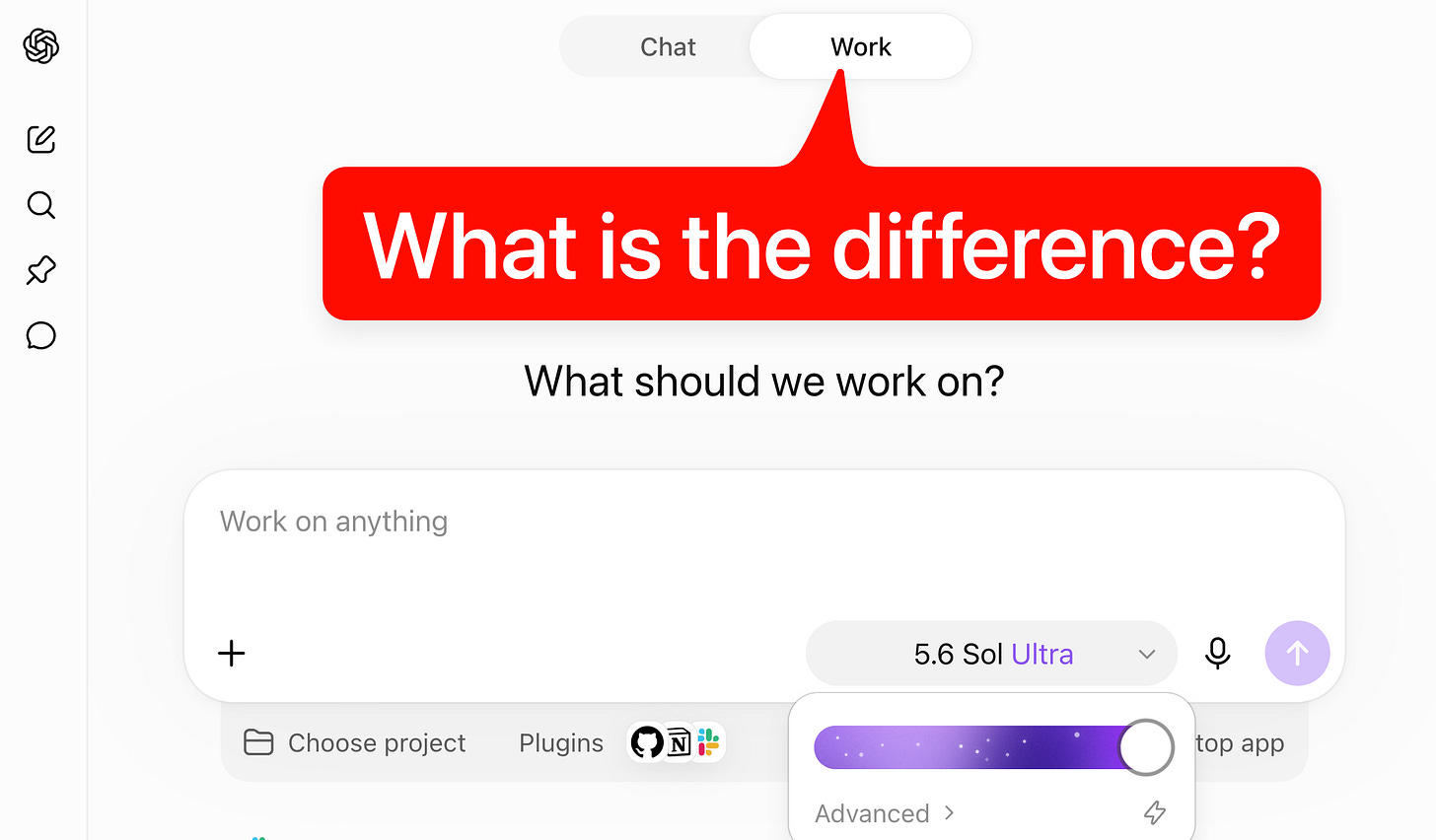
Chat and Work currently sit side by side as separate modes inside ChatGPT, but Greg Brockman has confirmed that they will merge by the end of the year (opens in new tab). Work, then, is not just a niche product for power users, but a preview of how ChatGPT’s billion weekly users will soon use the app. That’s why people inside (opens in new tab) and outside (opens in new tab) OpenAI are so excited about it, and why it deserves a closer look.

Work in its current form takes some decoding. It’s an amalgamation of ChatGPT (in chat form), Codex the app, Codex the harness, Codex the original cloud agent, ChatGPT agent, Atlas, OpenClaw, and more. The product lineup around it is confusing. And the web and mobile versions diverge from the desktop one (unless you run it in cloud mode?!).
So I spent the past few days trying to unpack it: what Work is, where it fits in OpenAI’s lineup, the many interesting choices in its design, the tensions underneath, and where I think it’s headed. Most of what follows comes from Codex and me poking around inside Work, and I’ve linked those conversations throughout so you can see where each claim comes from.
What is Work?
At its core:
An agent for knowledge work. You connect it to the places you already work—Slack, email, Drive, calendars, CRMs, project trackers, and hundreds of other plugins—and it gathers context across all of them to produce finished work.
Runs on the Codex harness. So it inherits the same models, sub-agents, browser use, and the ability to grind on a task for hours. Its UI is stripped of the evidence (git controls, diff-traces) that would give away you’re talking to a coding agent.
Lives in a cloud computer. Specifically, a beefy, isolated microVM (opens in new tab): Pro accounts get 8 CPUs, 20GB of RAM, and a 64GB disk; Plus gets 14GB of RAM. Alongside the VM, Work gets a managed Chrome service (opens in new tab) that the agent operates through tool calls.
Produces artifacts. Sheets, docs, and slides rendered in interactive viewers, plus Sites (opens in new tab): hosted web apps and dashboards it can build, share via URL, and keep updated.
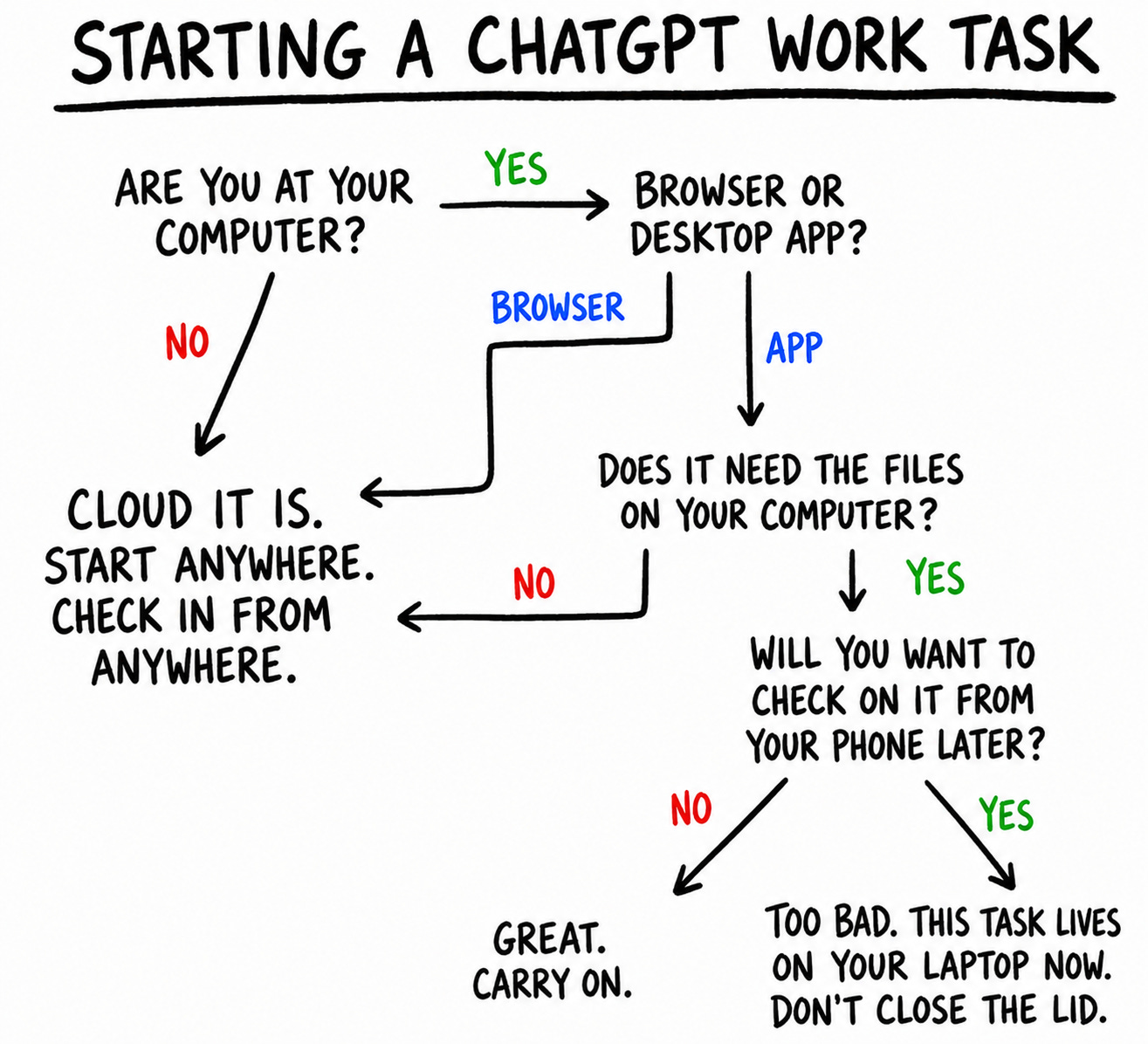
Every new conversation in Work is called a task. On web and mobile, Work runs in the cloud. You can kick off a task on web, track progress and give directions in the ChatGPT app on your phone, then view the result (maybe a report or a spreadsheet) back on your laptop.
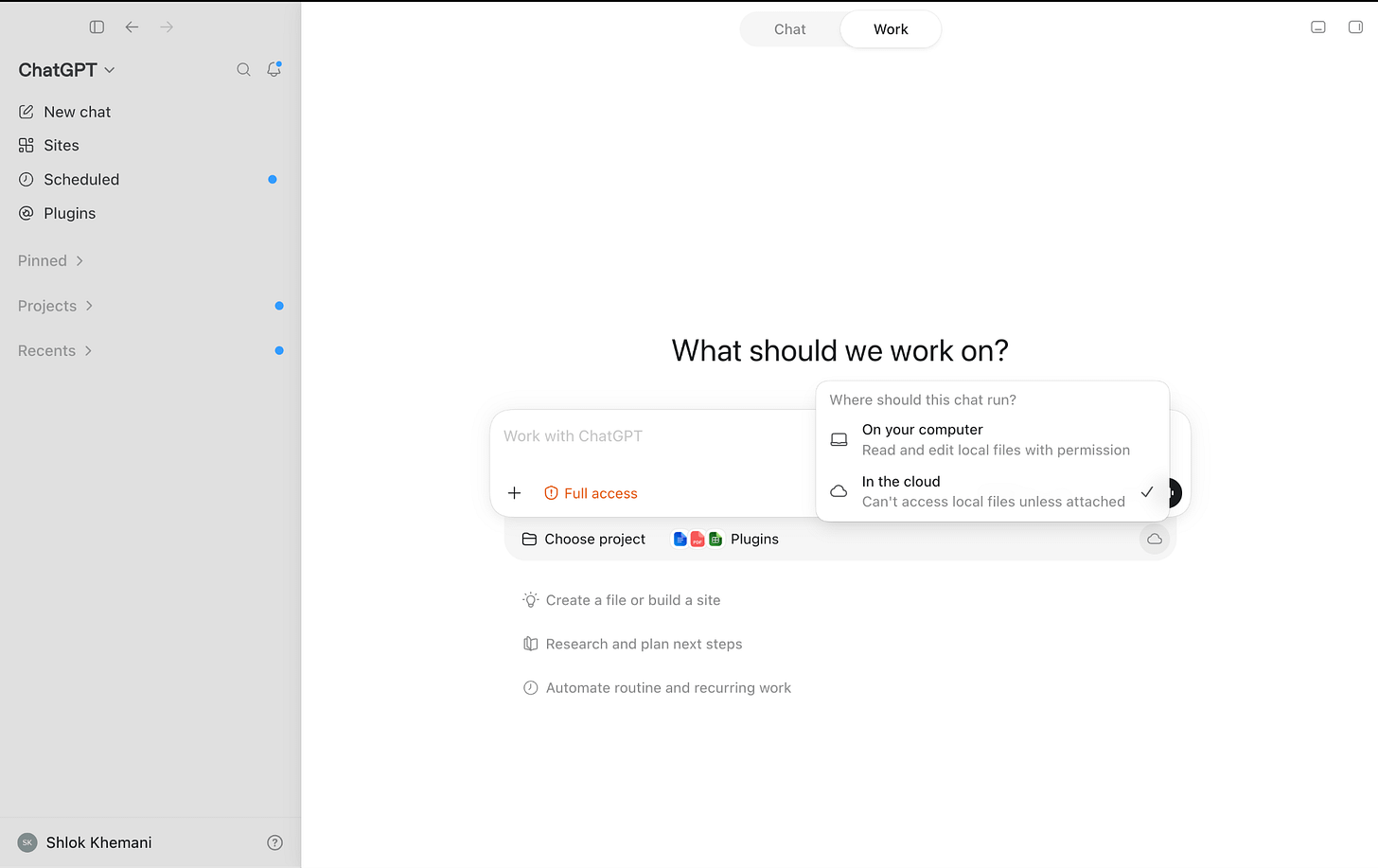
Work on the desktop app is slightly different and comes in two modes: cloud and local. In cloud mode, tasks run on the same cloud computer as web and mobile and sync across all three.
In local mode, the agent works directly on your machine, across your files and apps, with full computer use. These tasks don’t appear on web or mobile, and there’s no way yet to move a local task to the cloud. This makes local mode essentially Codex, minus the code-related UI traces that would scare off a non-developer.

On desktop, each new Work task can run locally on your computer or in the cloud.
But then things get a little confusing. OpenAI did release a way to hand off a Codex task to a remote environment (opens in new tab). Although this doesn’t work for me at the time of writing, I assume it eventually will, and that they will then bring the same functionality to Work.

For the rest of this piece, Work = Work in cloud mode.
Persistence & Memory
One big reason OpenClaw felt different from a chatbot was that the agent had a computer of its own. You could run it on an always-on laptop or a VPS, let it create directories, install software, and maintain databases, and reuse all of this across conversations and subagents. Its state lived not just in chat history, Markdown files, or a dedicated memory system, but across the whole computer.
Work’s cloud computer is persistent too (opens in new tab). But rather than running in one VM that stays on forever, its workspace is synchronised to persistent storage and restored onto isolated microVMs as needed. So the underlying machine can change, but the working state carries over. Compared to OpenClaw, though, the agent has far less sovereignty over this computer.
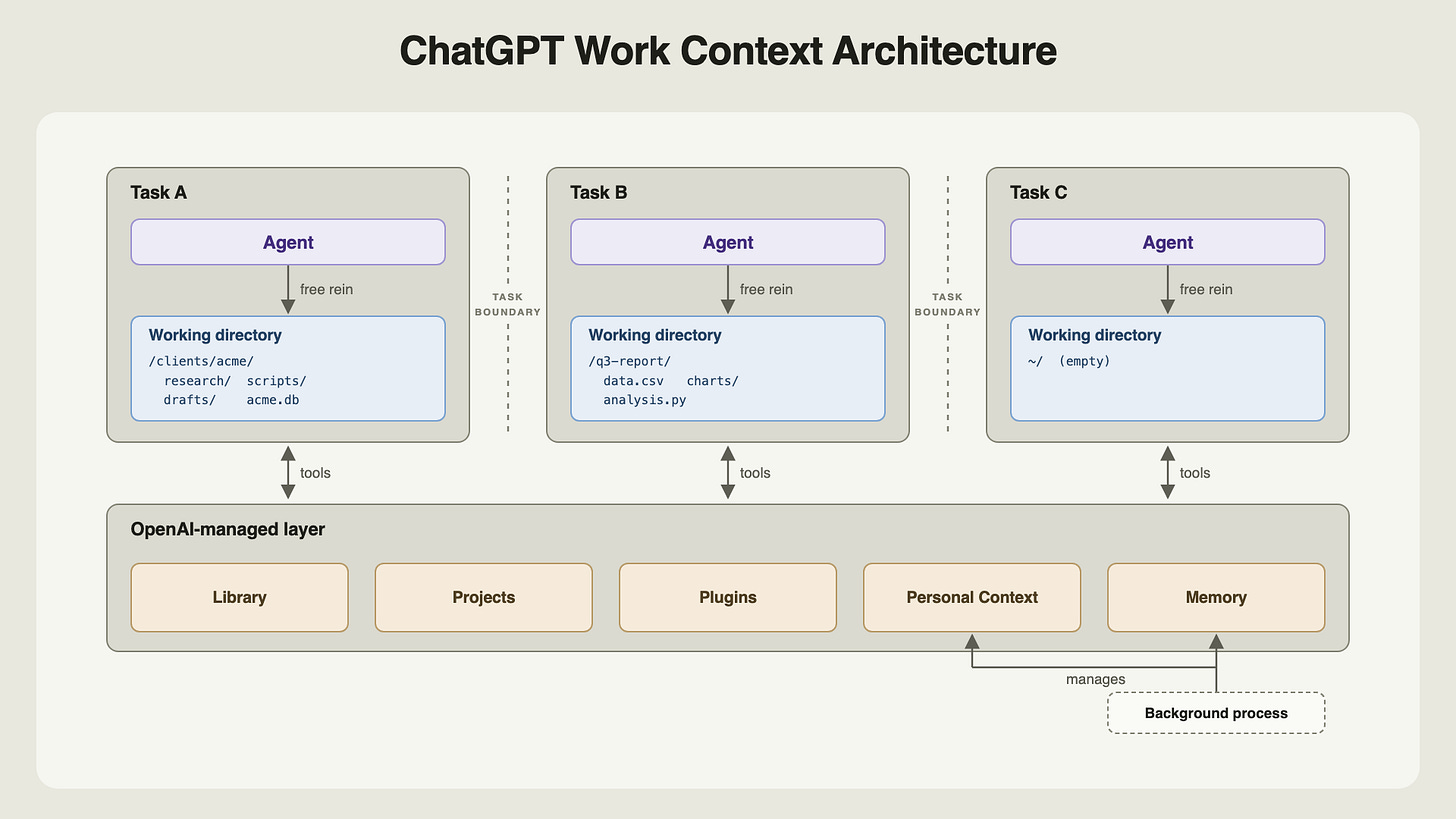
Every Work task (thread) gets a working directory under (opens in new tab) /workspace/scratch, where the agent has the freedom of a normal computer: it can make folders, install dependencies, write scripts, keep databases, and search everything with ordinary Linux commands.
When I ask it to make a presentation for Acme (opens in new tab), it can create clients/acme, copy in the source material, perform some analysis through code, and create charts and slides, all as files in the directory. When I follow up in the same thread (opens in new tab), it returns to that working state and can continue editing it.
But when a task needs context from other threads (opens in new tab), it does not treat their working directories as a shared workspace that it can navigate freely. It relies instead on the ChatGPT product layer.

By default, each new thread receives a compressed summary of recent tasks and files worked on (opens in new tab) . A summary might look like this (opens in new tab):
20260731T15:55 Prepare Acme pilot plan:\|\|\|\|
Turn the attached notes into a one-page plan for the Acme pilot, with an objective, deadline, and next steps.
\<\<File name=”acme_notes.txt”>>
Raw conversation transcripts are not stored on the computer for the agent to browse (opens in new tab). When a task needs context from previous threads, the agent calls Personal Context (opens in new tab), a dedicated tool that queries Chat and Work history through a separately managed service and returns the relevant excerpts.
Files follow the same pattern. ChatGPT’s Library (opens in new tab) is the central user-facing repository for all files and artifacts. User uploads land there automatically (opens in new tab); agent-created files are saved when the user asks, or when the agent judges them worth retaining. The agent can also create directories in the Library (opens in new tab) to keep it organised. Like conversations, the Library doesn’t live on the computer, and can only be reached through dedicated tools.
An uploaded file thus exists in two places: a working copy inside the thread and a canonical item in the Library. Interestingly, the two do not synchronise (opens in new tab). If Thread A uploads a file and Thread B later changes the Library version, Thread A continues to read its now-stale local copy when resumed.
When instructed explicitly, an agent in one task can navigate the scratch directories of other tasks (opens in new tab), find files, and modify them. But it won’t do this on its own (opens in new tab), and the directories have opaque names, no legible map to their conversations, and no stated retention contract.
Memory is managed externally too. As I’ve written before (opens in new tab), ChatGPT’s core memory primitive is a running, synthesised profile of the user. The product maintains that asynchronously and supplies it to Work when a task begins (opens in new tab). The agent can reason from it, but can’t modify it or create OpenClaw-style Markdown files that other tasks load by default.
ChatGPT’s Projects (opens in new tab) carry over into Work. Projects group related conversations, standing instructions, and Sources (user-uploaded files). A new task within a Project receives its instructions, summaries of relevant conversations, and local copies of Sources in its directory (opens in new tab). But the Project itself does not exist on the computer as a directory (opens in new tab), as it does in Codex. It too is an abstraction the product maintains.
In short, the agent has broad freedom within a task, but continuity across tasks runs through an opinionated ChatGPT product layer rather than the computer itself. Why the split? My guess is several reasons:
Work builds on existing ChatGPT primitives (Conversations, Library, Personal Context, Memory). Ripping all of that out and rebuilding it inside the computer would mean refactoring a stack that already serves a billion users.
The separation is a guardrail. OpenClaw-style unrestricted access to a single environment holding every file, conversation, and memory is unsafe for users (opens in new tab).
It lets OpenAI keep control of the product: what users see in the UI, how context is managed, and how sharing, cross-device sync, and file versioning work. All of that is harder to build if the agent could alter the environment at will.
What Work lacks today is a meta-layer agent, one that operates a level above individual tasks and projects and coordinates between them. (Some already use Codex this way (opens in new tab).) Perhaps that is coming, along with much else. Work is still young, and the architecture could look very different a few weeks from now.
Hints of useful proactivity
Today’s AI products are still reactive. Before the model can help, you have to notice that something needs doing, gather the relevant context, and translate it all into a prompt. The agent can do a stellar job from there, but the initial act of agency is still yours. Proactivity, where agents figure out how to be useful on their own, is one of the holy grails of personal AI.
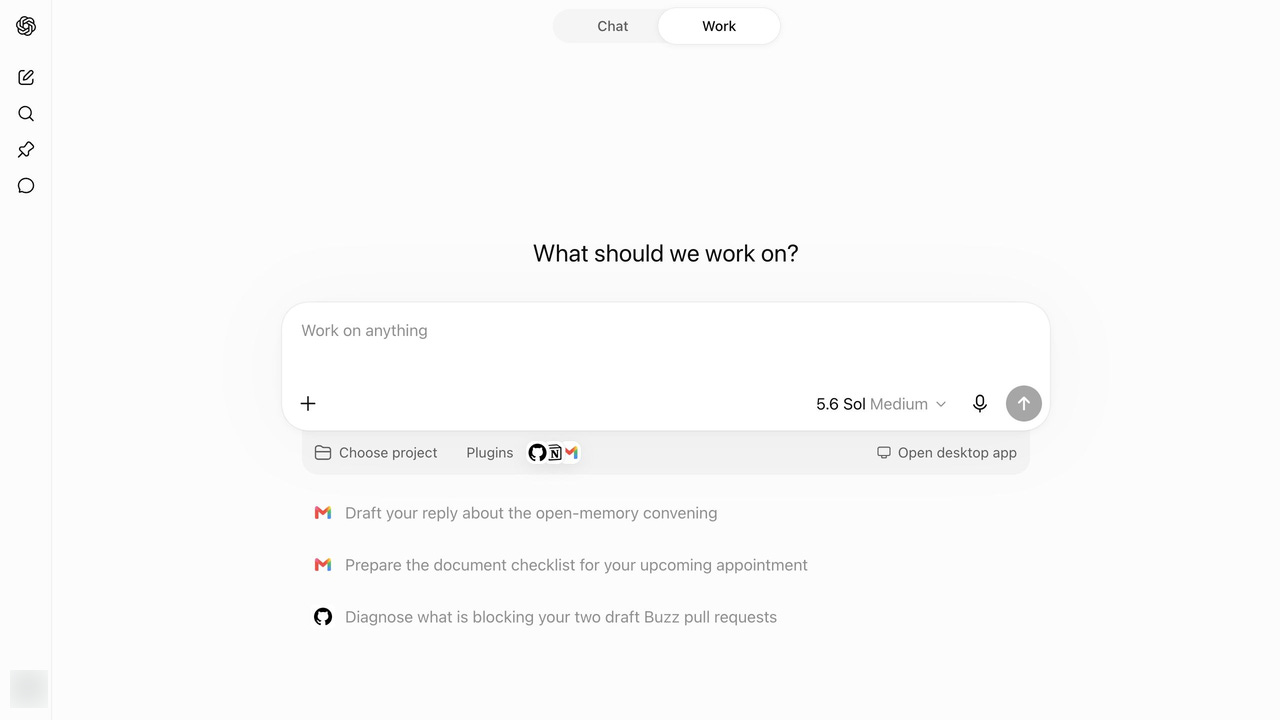
Work offers an early glimpse of that. When you open a new Work conversation, alongside the composer, you get personalized tasks generated from your own context.

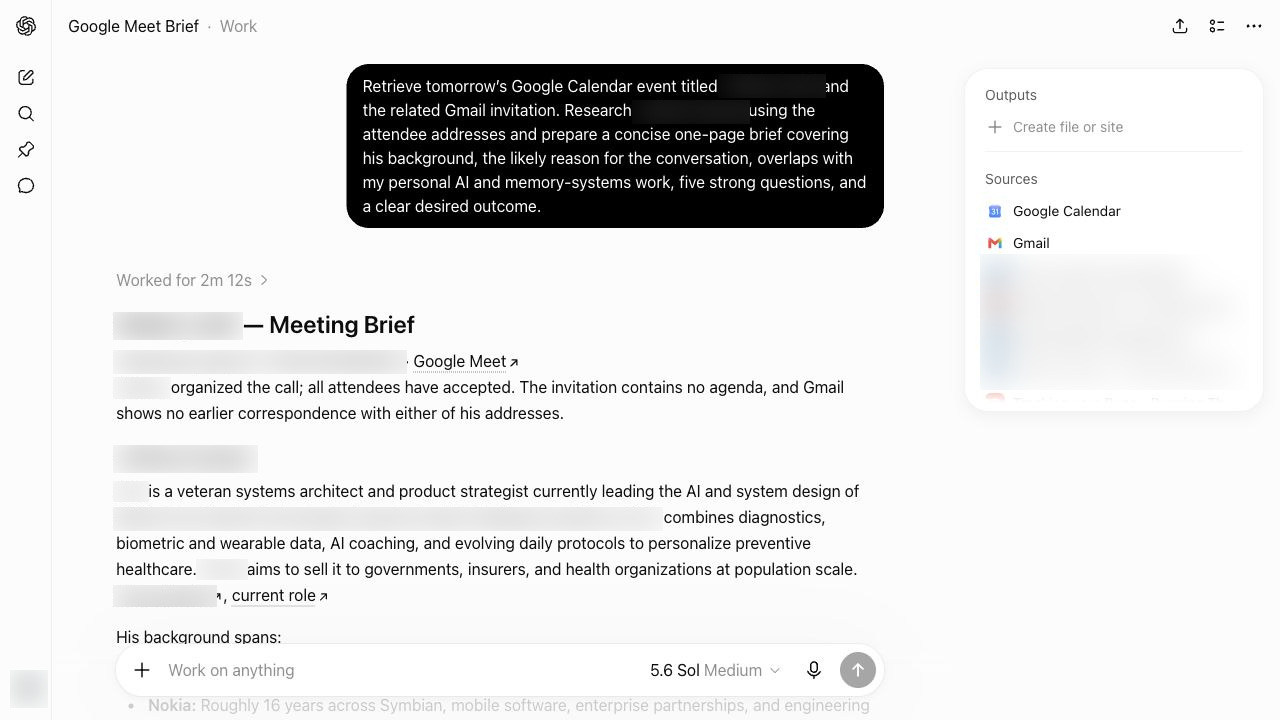
One suggestion offered to prepare me for an upcoming call. When I selected it, Work injected a pre-authored prompt. It had reasoned asynchronously across my context: noticed the calendar event, inferred that preparation would help, pulled data from Calendar and Gmail, and framed a task around the interests and preferences in my memory. When I sent the prompt, it got to work, and the result was a great meeting brief — one I didn’t know I needed!

Today, Work takes a credible first step: it suggests tasks. But nothing happens until I execute them. For true proactivity, it would have to complete the tasks it predicts I’d want done, without me in the loop. That future doesn’t seem far off.
Scheduled Tasks
Automations let Work run tasks at a future time or on a recurring schedule, without the user manually prompting it. They are ChatGPT’s abstraction for reminders and cron jobs.
OpenAI introduced them as Scheduled Tasks (opens in new tab) in January 2025. Work builds on the same scheduler but makes it agentic: each run can use the agent’s context and tools to complete the task.
They come in two types.
A standalone scheduled task begins each run from a saved prompt and opens a fresh task for the result. It suits self-contained work: a one-off reminder, a daily briefing (opens in new tab), a weekly job search, a routine email scan.
A scheduled task inside an existing conversation, triggered by a “heartbeat”, reawakens that task with its context intact. It suits use cases like monitoring a long-running operation, polling a connected service, or resuming a review loop at short intervals. At the time of writing, heartbeats work in the desktop app but are not exposed in Work on the web (opens in new tab).
Either automation can be set up as one-time or recurring. Its trigger can be an exact time, a loose window such as “in the morning”, or a condition the agent monitors.
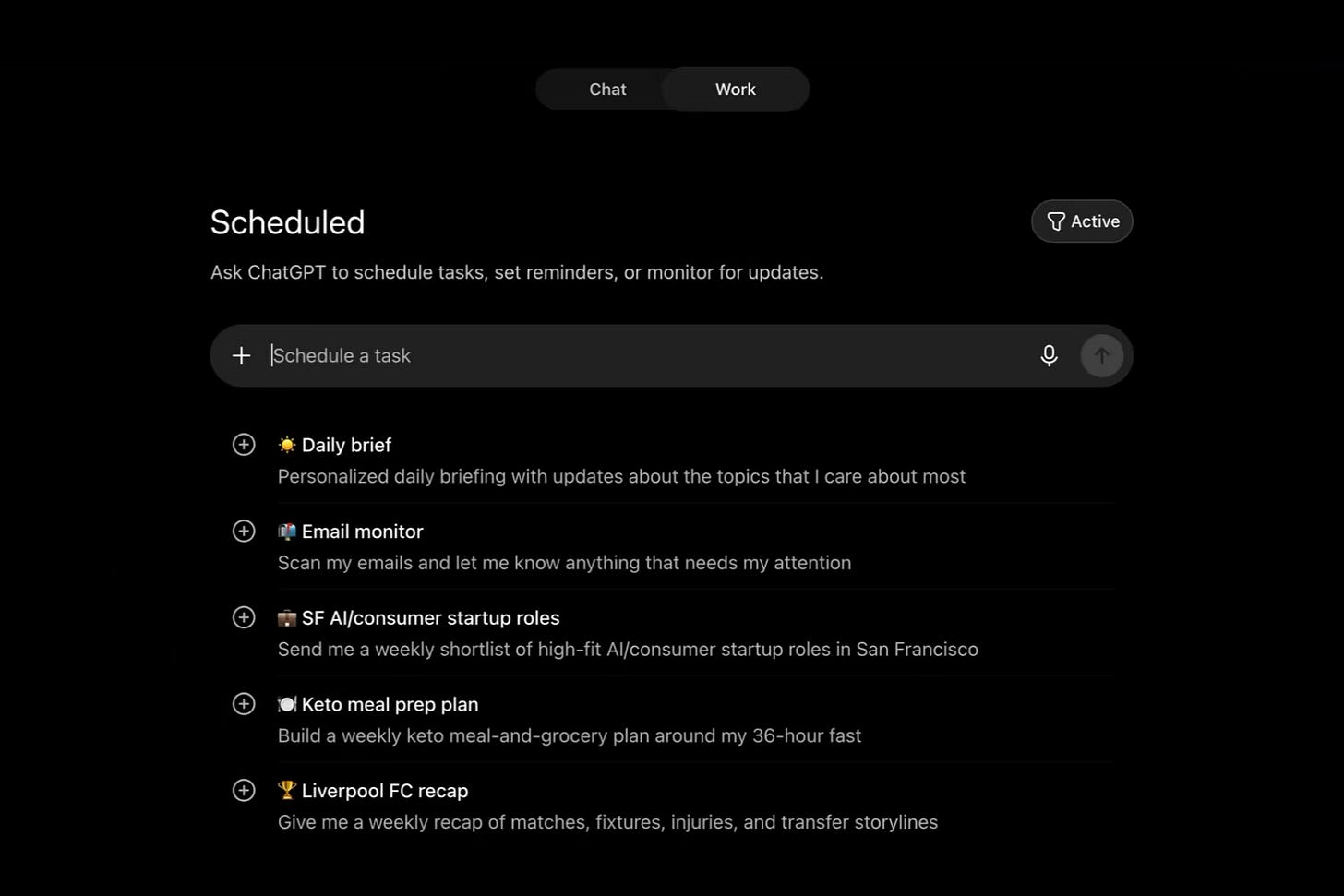
You can manage automations in two places. Inside a conversation, you can ask Work to create one, inspect existing automations, change their instructions or cadence, or pause and resume them. The Scheduled page puts all of this in a UI: every task with its next run and recent results, plus controls to create, edit, pause, or delete them.
The Scheduled page adds another element of proactivity: ChatGPT suggests custom automations for you. Some, like a Daily Brief, are generic; others, like a weekly recap for the football club I support, are personalized from my memory.

Browser Use
For years, ChatGPT had limited access to the web. It could search, retrieve pages, and use commands like curl to download files or call APIs. But it couldn’t click through an interface, stay logged into a service, or complete workflows like filling a form. ChatGPT first gained this ability with Operator (opens in new tab) and ChatGPT agent (opens in new tab). It then became a core part of Codex and now finds its most integrated expression in Work.
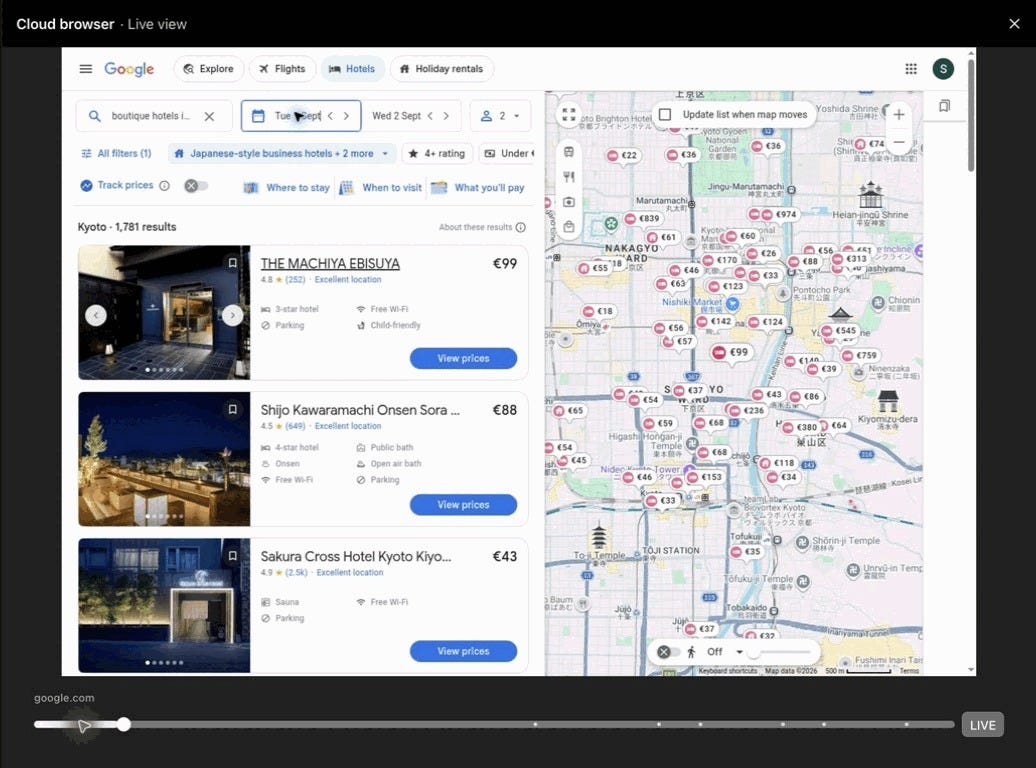
Unlike Codex running locally, the Work browser doesn’t live on the same computer as the agent. Instead, the agent controls a separately hosted Chrome service (opens in new tab) through tool calls. It can inspect the page, click, type, scroll, take screenshots, manage tabs and dialogs, and move files (opens in new tab) between the browser and its computer.
On web and desktop, Work shows a replayable timeline of the browser’s past states, so you can retrace what the agent did. You can also take over the live browser to navigate or enter a password, then hand it back to the agent. You can’t do this on mobile yet.

The browser service also keeps its own persistent profile (opens in new tab). New browser instances inherit preferences and logged-in sessions: I switched Wikipedia to dark mode and signed into Google in one task, and a fresh task inherited both (opens in new tab). The Work agent never sees this profile or its credentials. Instead, a small permission ledger is synchronised into its computer alongside the workspace (opens in new tab), recording, globally and per conversation, which sites it may act on and whether it may move files to or from them.
But because the cloud browser runs in a datacenter, and not on your laptop, it faces constraints a local browser does not. Amazon US rejected it as an unsupported “session or client” (opens in new tab), and Google Photos repeatedly timed out when I asked it to copy a shared album. Both tasks worked in local mode. Work can attempt a CAPTCHA, but only with your permission (opens in new tab), and it is instructed not to loop, rotate its fingerprint, or otherwise evade a site’s safeguards.
Still, the cloud browser makes Work far more capable. It can finish whole classes of tasks that ChatGPT with web search alone never could.
Plugins, skills, and tools
OpenAI has spent years searching for the right primitive to connect ChatGPT to outside apps and services: Plugins (March 2023) (opens in new tab), GPTs and Actions (November 2023) (opens in new tab), connectors (June 2025) (opens in new tab), and apps, the Apps SDK, and the App Directory (late 2025) (opens in new tab). In March 2026 (opens in new tab), plugins returned to Codex as packages of apps and skills.
With the July 9 launch (opens in new tab), the App Directory became the Plugin Directory, existing apps were packaged into plugins, and the directory expanded across Work and Codex. For now, OpenAI seems to have settled on plugins as the way for Chat and Work to interact with the external world.
A plugin today (opens in new tab) can contain:
Apps, which connect the agent to services such as Gmail, Slack, or Salesforce. Most use an MCP server to expose tools: discrete operations the agent can invoke, such as searching messages or sending an email.
Skills, which combine instructions with supporting material—references, templates, and sometimes scripts—to teach the agent a workflow.
App templates, which let an organisation configure the private or organisation-specific app a workflow depends on.
Plugins come in three broad types:
Operational plugins give the agent Codex-native enhancements. Computer Use lets it operate interfaces; Sites lets it deploy websites; Documents, Presentations, and Spreadsheets let it create interactive artifacts.
Role-specific plugins equip the agent for a particular kind of work. The Sales plugin (opens in new tab), for example, teaches it to apply 20 skills (Analyze Account Signals, Build Business Case) across 29 apps, including Salesforce and Slack.
Service plugins connect the agent to external products such as Gmail, Slack, Notion, Figma, Salesforce, and PitchBook.
Users can also create personal plugins (opens in new tab) by connecting a custom MCP server and, if needed, adding skills or custom UI. Developers who want to distribute a plugin more widely can submit it to OpenAI (opens in new tab); once approved, it is published to the Plugin Directory.
The Plugin Directory already holds more than 1,000 plugins covering most major apps and services, but discovery is a weak link. Work routes tasks to installed plugins seamlessly, yet never suggests a relevant plugin when one is missing. When I asked it to search for flights (opens in new tab) and hotels, it ignored several available but uninstalled travel plugins in favour of web search, even though a plugin might have used fewer tokens, returned better results, and let me complete a booking directly. Even naming Expedia outright didn’t prompt it to offer the plugin (opens in new tab).
I can imagine the product challenges: how does ChatGPT know when to handle a task itself, when to recommend a plugin, and which path serves the user better? And if several can do the job, which should it suggest? Without a solid discovery layer, though, OpenAI is leaving value on the table—for users, for developers, and for itself in its quest to become a platform (opens in new tab).
What’s Next
When Work folds into Chat later this year, its design choices will become the default for a billion people. Before then, OpenAI has to resolve a few tensions that kept surfacing as I used it:
Does the cloud computer become the user’s primary AI computer? And how can syncing between it and the local machine feel seamless?
Do Work agents get more OpenClaw-like sovereignty over that computer? Does ChatGPT keep the opinionated role it plays in continuity, or is there a middle ground?
How does Work come to feel as familiar to users as Chat? And in the meantime, how does OpenAI teach Chat users, from within the product and outside it, what Work is for and how to get the most out of it?
None of this should detract from the fact that Work is an impressive, ambitious, yet underrated launch. It consolidates years of scattered products and experiments into one increasingly cohesive whole. And it’s close to the ChatGPT OpenAI would build if it were starting from scratch with today’s agents.
I’m excited to see where it heads next.
I spend most of my time thinking about personal AI: going down rabbit holes like this one, figuring out what the best products are getting right, and imagining what our AI sidekicks will look like a year and five years from now. If you made it this far, we probably think about the same things, and I’d love to hear from you. Find me on X (opens in new tab) or through my website (opens in new tab).
Guest author Shlok — known for teardowns of AI-lab memory systems — unpacks OpenAI's ChatGPT Work (launched July 9, 2026) from hands-on probing with Codex, with linked conversation logs throughout .
What Work is: an agent for knowledge work that runs on the Codex harness and lives in a persistent cloud microVM — Pro gets 8 CPUs/20GB RAM/64GB disk, Plus 14GB RAM — plus a managed Chrome service; it outputs Sheets/Docs/Slides and hosted Sites . Desktop Work has cloud and local modes; local mode is "essentially Codex, minus the code-related UI traces", and local tasks don't sync to web/mobile with no migration path yet .
Persistence architecture: the workspace syncs to persistent storage and is restored onto isolated microVMs; each thread gets a /workspace/scratch directory with full OS freedom (folders, dependencies, scripts, databases). Cross-thread continuity runs through the ChatGPT product layer: compressed summaries of recent tasks/files, a Personal Context tool that queries Chat and Work history, and a Library for files that lives off the computer and does not sync with thread-local copies. An agent can browse other tasks' scratch dirs only when explicitly instructed, and won't do it on its own . There is no meta-layer agent coordinating between tasks yet — some users already run Codex that way .
Proactivity & scheduling: new conversations surface personalized suggested tasks generated asynchronously from calendar/Gmail/memory, injecting a pre-authored prompt; nothing runs until the user executes . Scheduled tasks come in two forms: standalone (saved prompt, fresh task per run) and heartbeat tasks inside an existing conversation that reawaken it with context intact — heartbeats are desktop-only for now; triggers can be exact time, a loose window like "in the morning", or a monitored condition .
Browser use: Work drives a separately hosted Chrome via tool calls, with a persistent profile (logins/preferences carry across tasks) and a synced permission ledger; users can take over the live browser on web/desktop, not mobile. Datacenter-browser constraints: Amazon US rejected it as an unsupported session, Google Photos timed out, and CAPTCHAs require explicit permission — no fingerprint rotation or evasion; the same tasks worked in local mode .
Plugins/skills/tools: a plugin bundles apps (mostly MCP-server tools), skills (instructions + references/templates/scripts), and app templates; three types: operational (Computer Use, Sites, Documents), role-specific (e.g., Sales plugin teaches 20 skills across 29 apps), and service (Gmail, Slack, Notion, Figma, Salesforce, PitchBook). The Plugin Directory holds 1,000+ plugins but discovery is weak — Work ignored available travel plugins for flights/hotels in favor of web search, even when Expedia was named .
Scale/trajectory: Work + Codex reportedly crossed 10M users three weeks in; Greg Brockman confirmed Chat and Work will merge by end of 2026 .