We can't find the internet
Attempting to reconnect
Something went wrong!
Hang in there while we get back on track
Anthropic: humans design, Claude ports, shadow traffic verifies
On Latent Space, Anthropic's platform team said it has fully rolled out a Rust version of the Messages API, replacing a CPU-hungry Python monolith . When they chose Rust, the team had no Rust developers. Claude wrote the code, and humans designed the distributed-systems architecture . They said the two things that mattered most were the plan and the verification. They built a complete Rust fork of the API, ran shadow traffic through it, and compared its outputs with the Python system's . They ported the whole system and then turned it on gradually, instead of the piece-by-piece migration they said would normally take years . They also kept it a pure port and held back new features . They estimated about 40–50% CPU savings and a 10–20% improvement in time to first token .
The steps you can copy: write the plan yourself, have the agent do a scope-frozen port, and check it by comparing outputs from the old and new systems on real traffic.
Their other advice from the same episode:
- Evals: the most common mistake is having too few. Start simple, build a fairly large suite, and let agents help it grow . Treat engineering like research: define the goal as an eval, then check whether a failure comes from the eval, the environment or the model. "A lot of times your eval is wrong" .
- Multi-agent: use one lead and split work that can run in parallel across subagents that share context. The subagents should run asynchronously and not block each other. "Other than that, like let it rip" .
- Sandboxing: Claude Managed Agents keeps the harness (the "brain") on a durable server, separate from the sandbox (the "hands"). The agent sees only placeholder credentials. An egress proxy injects the real ones from a separate vault, and network access can be limited to an allowlist of domains or turned off .
LangChain open-sources its design agent harness
LangChain's Content Studio is a Slack agent that makes slides, charts and videos. It runs on Managed Deep Agents, and LangChain has published the harness for others to fork . LangChain reports median model spend per request fell from about $8 to about $0.50, and its own code shrank about 80% after moving to Managed Deep Agents . Several of the patterns apply directly to coding agents:
- Everything is code, in a persistent sandbox. Each Slack thread gets its own Linux sandbox. Slides are HTML, charts are data specs and videos are animation timelines, so an edit can change one value and rerender .
- Rules that must always hold go in code, not the prompt. The agent sometimes skipped a review step that was only described in its instructions. The pipeline now blocks assembly until every part passes review: "The order that must always hold lives in code, and the judgment stays in the prompt" .
- Skills are scoped to jobs. A router skill maps request types to specialist skills. Each of the 48 skills reads like a routing rule, including when not to use it . MCP tools sit behind search, and their schemas load only when needed .
-
The main agent acts as a "chief of staff." Subagents run asynchronously. Each gets a brief covering its role, context, which files it owns and how to validate its work, plus a model and effort level chosen for the task. The coordination tools are
start_task,check_tasks,cancel_task/resume_task,report_progressandschedule_wakeup. -
Memory stays small.
AGENTS.mdis limited to a 200-line index, after an earlier version grew to 500K tokens. After each job, a subagent records up to five evidence-backed lessons, and a weekly pass promotes the useful ones into skills . - Remove workarounds when models improve. After Opus 5.5, they removed most hard-coded rules and kept only principles. They got more variety and less repetition .
Harrison Chase's Interrupt London talk covers similar ground. LangChain's open-source OpenWiki builds a coding knowledge base from your repo. It can also read Codex or Claude Code traces to find what the agent struggles with . His eval advice: grade the final environment state or the tool-call sequence, not just the answer . Run evals that write data against a mock or dev environment, not production .
Claude Code mods: build them by describing them
Addy Osmani posted a guide to Claude Code mods. Mods are JS/TS files that react to session events, change Claude Code's behavior or draw custom UI . They are hooks chained like middleware. Each hook can observe an event, rewrite it, or answer it so the default behavior never runs . To make one, describe it to Claude, approve the files and enable hot reloading. Then keep asking for changes without restarting . Mods made this way last only for the session. To keep one, copy it from ~/.claude/dev-mods/<session-id>/ and install it as a plugin . The API may change, so use the generated types in .claude-plugin/types/ as the reference for your version .
Example code for Token Weather (context usage), Blast Radius (confirming risky commands) and Replay Theater (per-edit diffs, including subagent edits) is in anthropics/claude-code-playground . Mods are not sandboxed and run with your permissions . Blast Radius only reads the command text, so $(…), aliases and scripts can get past it. Use permission rules if you need a hard block .
Benchmarks: a coding test graded on whether it would be merged
Artificial Analysis Intelligence Index v5 adds FrontierCode 2.0, Cognition's private benchmark. It grades real-world coding tasks on whether a repository maintainer would merge the agent's change . On the overall index, Opus 5.5 (max) leads at 58, followed by GPT-6 Astra at 57 and GPT-6.1 Sol at 55. The best released open-weights models score 32 . Among the top 10, cost per task runs from $0.96 for GPT-6.1 Terra to $13.04 for Claude Fable 5.1 .
Short notes
- Cursor design mode added Annotate. You can edit elements, draw on the page and check different screen sizes as visual prompts for the agent . Open it with Cmd+Shift+D in the browser (docs) .
- Kent C. Dodds says he ships dozens of PRs a day with Cursor and rarely opens the Cursor app. He drives it through Grok Bot . When his Cursor credits ran low, he had the bot move work to Devin's cloud agent, with Kody handling the handoff . He says he would use the Claude and OpenAI cloud agents more if they had APIs . On dropping PRs, he says he would first have to rebuild what PRs give him: AI review, preview deploys, CI and a record of decisions .
- Matt Pocock trusts agents most on tasks where they have all the data, can run experiments, can verify results on their own, and can hill-climb toward the goal .
- Steve Yegge says his Wheelhouse software factory produces 2,000–4,000 commits a week and runs without sandboxing. Its constraints are doctrine and policy, human gates and 14 programmatic denials . He warns these setups are expensive, hard to maintain and risky in enterprises .
- T3 Code: Theo says a change from Cursor broke the latest nightly. He is building a pipeline to prevent this and recommends the stable channel .
- Anthropic’s team ported its Messages API from a Python monolith to Rust despite having no Rust developers at the outset; humans designed the distributed-systems architecture and Claude wrote the implementation. They built a full Rust fork, ran shadow traffic through both systems, and compared outputs before rollout; they kept the migration to a port rather than adding features. The team reported roughly 40–50% CPU savings and 10–20% improvement in time to first token.
- Build a real eval suite early: start simple, expand it over time, and use agents to help evolve it rather than hunting for a perfect small set of tests. Treat engineering like research: define the goal, formalize it as an eval, then check whether a failure comes from the eval, the environment, or the model.
- Claude Managed Agents offers programmatic APIs for defining an agent and starting a session, so developers can skip building much of the agent infrastructure and harness themselves. For custom harnesses, the guidance is to start with simple primitives and experiment with multi-agent strategies: use one lead, delegate parallelizable tasks with shared context, and keep subagents asynchronous and non-blocking.
- For safer agent execution, separate the durable harness and agent state (“brain”) from the sandbox that executes work (“hands”); keep credentials in a separate vault and inject them through an egress proxy, while restricting network access with domain allowlists or disabling it.
- For Claude API integrations, use the Claude API skill in Claude Code or another coding agent, or provide a reference architecture for the agent to implement; the interviewees describe these as useful alternatives to relying on a large, complex cookbook when building different implementations.
- LangChain's Content Studio is an open-source Slack design agent built on Managed Deep Agents. Each Slack thread gets an isolated Linux sandbox that preserves its project; code-based assets and a shared project folder let the agent and subagents revise and rerender work without starting over. Teams can fork the repo, add brand tokens, fonts, and skills, and deploy it to Slack.
- Separate agent context by function: a router maps request types to workflows and specialist skills; 48 job-scoped skills span nearly 1,000 files, while a wiki centralizes company and design references and code gates enforce measurable checks. To limit context use, expose MCP tools through keyword search and load their schemas as needed.
- Encode subjective judgment as design principles, guardrails against common AI patterns, and the reasoning behind feedback. Their fast learning loop saves feedback to shared or personal memory files; after each job, a subagent captures up to five evidence-backed lessons, with useful lessons incorporated into skills and the wiki weekly. After Opus 5.5 improved output, they removed most hard-coded rules while retaining principles and high-level guidance.
- For expensive media work, explore in a storyboard first—about 50 ms per frame versus 8–40 seconds to render one second of finished film—then approve a direction before animatic and production; enforce this order in code because prompt instructions alone sometimes let the agent skip review.
- For hours-long projects, make the main agent a coordinator that delegates asynchronous tasks with briefs specifying role, context, file ownership, and validation, and selects model and effort based on task complexity. Keep the team able to steer the work with progress updates, a plan and ETA, live status and spend, and an approval step before publication. In an overnight 52-slide reskin, the agent reviewed three sample slides before building the rest in approval batches; the main agent ran for about an hour while subagents worked for more than six hours.
- LangChain reports that Content Studio has delivered over 3,000 assets, including more than 80 decks; median model spend per request fell from about $8 in mid-September to about 50 cents, and its code shrank about 80% after migrating to Managed Deep Agents.
- Coding-agent memory: LangChain’s open-source OpenWiki is a coding-focused knowledge base populated from a repository; integrations inspect Codex and Claude Code traces for what the agents struggle with and feed those findings back into the wiki.
- Improvement loop: Preserve exact inputs, outputs, and event sequence in traces; inspect failures, add them as eval cases, then propose changes to the model, harness, or context and use evals to check for regressions.
- Evaluate actions, not just answers: Set criteria for the final response, resulting file or environment state, or tool-call sequence. Run write-affecting end-to-end evals in a mock or development environment rather than production.
- For a bespoke PDF reader, the presenter used Opus 5.5 to draft a detailed build prompt, then gave it to DeepSeek at high-thinking settings, specifying Electron, React, TypeScript, and PDF.js. The resulting Folio included PDF reading and annotation features such as highlights, drawings, notes, signatures, dark mode, export, and printing; he says he built it locally, or that inference would cost less than a couple of dollars.
- In a local-model trial, he ran DeepSeek on a DGX station and had it build GridLine, an offline-first browser spreadsheet, in 50 minutes; he says a quantized version can run on a decent high-end consumer GPU. GridLine handled formulas, fill-down, and charts, but did not have all of Excel’s functionality.
- For a capability test, he deliberately used the simple prompt “Build a 3D simulation of a Rubik’s cube. Scramble and solve” to see whether the model could infer the expected details without a highly explicit specification; he reports that the scramble and solve worked accurately.
-
To build a Claude Code mod, describe the behavior or UI you want, approve Claude’s generated files, and enable hot reloading; then refine it with follow-up requests without restarting. The API can change between releases, so use the type declarations generated in
.claude-plugin/types/as the reference for your build. A mod made this way is session-only; copy it from~/.claude/dev-mods/<session-id>/and install it as a plugin to keep it. - Mods use event hooks chained like middleware: hooks can observe events, rewrite them for later hooks, or handle them instead of Claude Code’s default behavior. Practical examples include Token Weather for context-window usage, Blast Radius for previewing and confirming risky commands, and Replay Theater for reviewing turn-by-turn edit diffs, including subagent edits.
-
Treat mods as trusted local code, not a security boundary: they are unsandboxed and run with your permissions, while Blast Radius can miss commands involving substitutions, aliases, or scripts. Inspect the source and run
claude plugin validate; use permission rules for hard blocks.
An “Apple II Agent” using Opus 5.5 drew a pelican riding a bicycle on an Apple II, with examples shown in color and monochrome . Simon Willison praised the results .
- Keep creative judgment human: Tossell decided to manually identify which agent sessions could become useful stories, and to clarify each repeated workflow before automating it. He uses agents for execution-heavy setup such as preparing recordings and exports, editing transitions, uploading videos, and publishing pages.
- For visual explanations, he asked an agent to combine TL Draw with Pelle, which encodes layouts in code so visual styles can be applied. He steered the result toward an HTML site rather than a canvas-only output and had the agent restore missing annotations and arrows. He also explored having the agent build reusable visual components, such as consistent boxes, agent icons, webpages, people, and cameras.
A Latent Space episode featuring Anthropic’s engineering and product leads covers how Anthropic builds Claude with Claude; its platform is used to build first-party harnesses including Code, Tag, and Duet, and by more than 50% of Anthropic’s top customers.
-
Give the agent a persistent, editable workspace. Content Studio creates an isolated Linux sandbox for each Slack thread, where the project persists and subagents share files. Because outputs are code, an edit can change one timing value and rerender instead of rebuilding an asset; its motion toolkit includes HyperFrames for linting, frame checks and rendering, plus
motion-studiofor original per-pixel animation . - Keep task context modular and load tools on demand. A router maps request types to job-specific skills; the 48 skills (about 1,000 files) compose rather than duplicate craft, while a central wiki holds shared brand and product context. MCP tool schemas are searched and loaded as needed to limit context use .
- Retire workarounds as models improve. The initial harness supplied 115 reusable components, but the agent repeated layouts; after a reported quality jump with Opus 5.5, the team removed most hard-coded rules and kept high-level principles, reporting more variety and less repetition. They handle measurable issues with deterministic code checks and capture designers’ reasoning for subjective judgments in skills .
- Make expensive work spec-driven. A storyboard frame takes about 50 ms to render, versus 8–40 seconds for a second of finished film, so the agent explores and gets approval on a storyboard before creating an animatic and entering production. Since instructions alone sometimes failed to prevent skipped reviews, code now blocks assembly until every act passes review .
- Run long jobs asynchronously with a steerable coordinator. The main agent divides work into background tasks with a role, context, file ownership and validation criteria, choosing a model and effort level for each task. The Slack thread reports plan, ETA, live status and spend, acknowledges edits and requests approval before anything goes public; people can steer the agent while work continues .
-
Build feedback into memory loops. The agent saves preferences in the same turn to shared-team or personal memory; after a job, a lightweight subagent records up to five evidence-backed lessons, which later jobs rate and a weekly process promotes into skills or the wiki. Their
AGENTS.mdfiles are limited to a 200-line index after an earlier version grew to 500K tokens .
The team open-sourced the harness, including its sandbox, skills, wiki, memory, async subagents and Slack UX, for others to fork and customize .
ThePrimeagen is considering trying the linked GrokBot multi-agent setup and asked whether followers want a video about his experience; he has not reported a test or results yet. The linked post pitches a team of 50+ agents organized as a Chief of Staff, three PMs, and 40+ workers, but that is the other poster’s description, not ThePrimeagen’s firsthand experience.
Steve Yegge says his Wheelhouse software factory, running on a light multi-machine setup, produces 2,000–4,000 commits per week; its agents work around the clock on building, reviewing, and deploying features, as well as other startup operations. He favors an open, exploratory setup over sandboxing: agents can see the whole system and act independently, with doctrine and policy, human gates, and 14 programmatic denials as constraints; they work under his identity while signing their work under their own names. He cautions that software factories can be expensive, hard to learn and maintain, and risky in enterprises—and that tighter restrictions can undermine the collaboration and exploration that make them productive.
Steve Francia worked with Gemini to get a full NES emulator running on a GitHub Universe conference badge, then deployed Game Boy and Game Boy Color emulators on it; with the ROM, the badge can run The Legend of Zelda: Link’s Awakening .
Claude Code’s quoted release note says --dangerously-skip-permissions still blocks some obvious commands, such as rm -rf ~, but setting CLAUDE_CODE_EVEN_MORE_DANGEROUSLY_SKIP_PERMISSIONS=1 can disable those remaining blocks. The post responds with an emphatic warning: “DO NOT USE OR YOU WILL BE FIRED.”
Kent C. Dodds said eight hours had passed since an agent session that ran past his bedtime; he shared no workflow details. PowerSync sponsored the accompanying video and was promoted for real-time and offline-first capabilities for users and agents, not described as a tool Dodds had personally used.
Kent C. Dodds says he is adding an “execution contexts” primitive to Kody, which he says will enable new things with agents; he provides no implementation details or availability information.
Kent says he uses Cursor for most of his work, ships dozens of PRs daily, and rarely opens the Cursor app or site . Asked how, he says he uses Grok Bot (@bot), not t3 code or the CLI .
Matt Pocock describes agent-friendly tasks as ones where the agent has all the data, can run experiments, verify results independently, and “hill-climb” toward the goal; he says trust and results are strongest on these tasks. Kent C. Dodds replied that this category may soon expand to “everything.”
A developer integrating Kody into their workflow says it could be a major unlock for cross-agent work and that its secret management solves a real pain point, though it took time to understand the tool . Kent C. Dodds says he wants to help users reach that “light bulb moment” faster .
- LangChain’s open-source Content Studio is a Slack design agent built on Managed Deep Agents. Each Slack thread gets an isolated Linux sandbox that preserves the project across turns; assets are built as code, so the agent can make targeted edits and rerender, and subagents share the project folder.
- For complex jobs, the main agent acts as a coordinator: it delegates isolated tasks to async subagents, gives each a brief with its role, context, file ownership, and validation criteria, and selects a model and effort level for the task. People can steer work mid-run; Slack shows the plan, ETA, progress, spend, and an approval step before anything goes public. An overnight reskin of a 52-slide deck used three sample slides and approval before the agent continued in batches; the main agent ran about an hour while subagents worked for more than six hours collectively.
- Keep knowledge and execution rules structured: job-specific skills route work, a shared wiki holds reusable context, and deterministic checks handle measurable requirements. The team also enforces required workflow stages in code while leaving creative judgment to instructions.
- Treat model-specific workarounds as temporary: after Opus 5.5 improved, LangChain removed most hard-coded rules while retaining design principles, and reported more varied, less repetitive results. Content Studio has delivered over 3,000 assets; median model spend per request fell from about $8 to about $0.50, and the team’s code shrank about 80% after migrating to Managed Deep Agents.
Kent C. Dodds says he has repeatedly made over 100 releases a day as a solo maintainer and could work without PRs, but would need to recreate the confidence-building functions they provide: AI review, preview deploys, CI, and historical decision records.
How We Built Our Design Agent

Key takeaways
Taste comes from context. Models already write good code, but they need your designers’ principles, guardrails against AI slop, and the reasoning behind feedback to make work that looks like yours.
Give the agent a designer’s computer. Every Slack thread gets its own sandbox where the agent keeps the project between turns, works across a video engine, image tools, and a shared canvas, and inspects its own renders.
Delete rules when the model improves. Rules that make up for a model’s weaknesses expire, so keep the design principles and remove the workarounds as models get better.
Long-running agents need multiplayer UX. Big jobs run for hours on async subagents, so the Slack thread shows the plan, live progress, and an approval before anything ships, and anyone on the team can steer the agent mid-run.
You can fork it. The open-source repo has the full harness, and Managed Deep Agents deploys it to your team’s Slack.
The promo above was made by Content Studio, our design agent that can create videos, social graphics, recreated UI images, slide decks, and more from just a single prompt in Slack. Every asset the agent produces is written in code.
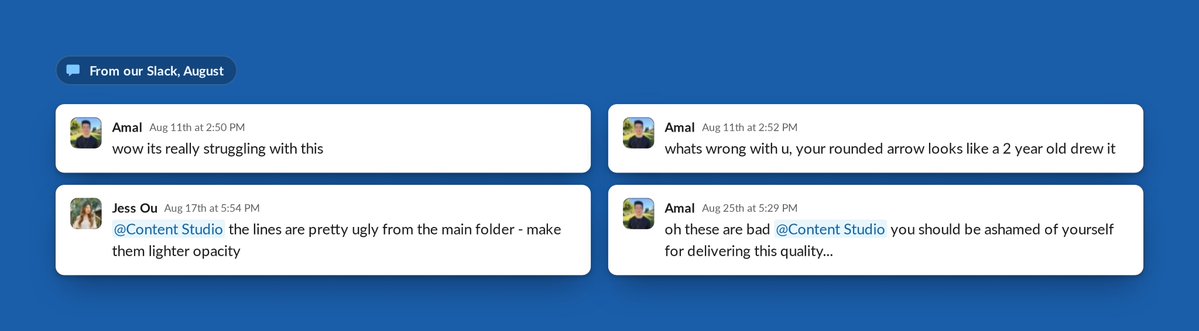
Content Studio was built entirely in-house on Managed Deep Agents (opens in new tab). It’s now one of the most widely used GTM agents within our company, but it didn’t start out that way. Early feedback was… not great.

So how did we go from such low quality to this?

We’ve spent four months teaching Content Studio our taste and design principles, mostly by watching it get things wrong in front of the whole company.
This post walks through how our GTM Engineering team worked with our design team to build Content Studio from scratch: what good design means to us, how we taught the agent our taste, and the harness that lets it make anything from a still to a launch film.
We’ve open-sourced our design agent. Fork the open-source repo (opens in new tab), add your brand tokens, fonts and skills, and deploy it to your team’s Slack with Managed Deep Agents (opens in new tab).
Then join us at GTM Engineering Live (opens in new tab) on October 28. We’ll go under the hood of the harness and the UX, and show the work that didn’t fit in this post.
Building a design agent for scale
LangChain moves fast. We have constant product launch campaigns, webinars, blogs and events. Each initiative needs assets, from blog headers and diagrams to decks, videos and ad creatives. Our design team was stretched thin, with repetitive requests crowding out more strategic and innovative work. As a lean startup, we needed a low-friction way for anyone at the company to create high-quality, on-brand work.
To address these needs, we built Content Studio, a design agent that lives in Slack. A team member describes what they want and attaches accompanying content or briefs, and the agent returns finished, on-brand files. To build Content Studio, we needed three things:
Our designers’ expert judgment, written into the agent’s skills and checks so it knows what good looks like.
A custom environment around the model, including a video editing computer with tools for every layer of the design work.
The right UX, so a whole team can collaborate on a project that runs for hours from one Slack thread.

Managed Deep Agents (opens in new tab) gave us everything we needed to productionize Content Studio inside our company: a managed LangSmith Sandbox (opens in new tab), integration with Slack, managed tools, scoped agent memory and scheduling agent runs. This allows a small team to spend its time on the design work, the skills, tools and Slack experience, instead of the plumbing.
Key results
Content Studio has delivered over 3,000 assets across the company, including more than 80 slide decks. One of its decks was even used in our most-watched organic YouTube video.
Posts with its work drew about 4.5M views on X.
On the LangChain account, posts with its visuals have earned about 2x the likes and 3.7x the bookmarks of other posts.
Three in four requests now come from outside marketing, and 75% of users are repeat visitors who come back every week.
The median request now costs about 50 cents in model spend, down from about $8 in mid-September. Our own code shrank by about 80% after the migration to Managed Deep Agents (opens in new tab).

Is AI actually good at design?
Before jumping into the build, let’s first address the debate of the century: can AI actually produce good design?
The model was already good at execution and could write HTML and CSS, chart specs and animation timelines. However, it didn’t have our context, so it reached for familiar patterns, a tactic Anthropic calls “distributional convergence” (opens in new tab). The result could look polished and still look like a hundred others, or be beautifully animated and never get its point across. Familiar isn’t always bad, but we wanted our agent to make choices that followed its purpose.
Katie Dill (opens in new tab), Head of Design at Stripe, makes a helpful comparison. Under pressure to build quickly after World War II, builders copied the clean shapes and bare surfaces of modernism over and over. The copies kept the look while losing the thought and character behind it. Her warning is that AI can do the same to software. She calls it “zombie UI” and says we need a point of view, because “if you don’t, AI will give it for you.”

We don’t think AI is bad at design. It just doesn’t have a point of view unless you provide it, and giving it ours meant teaching it our taste.
Teaching a design agent taste
Taste is the judgment that separates work that’s correct from work that’s good. In design, two layouts can use the right fonts, colors and spacing, and only one of them makes its point. Taste comes from what Dill calls “getting really good at noticing.”
That noticing is how we learned to spot AI slop, which most often shows up when a brief leaves a decision to the agent.
For example, the image on the left below was created by a local coding agent with our brand skill (which includes colors, fonts, logos, etc.). But the final result missed critical components, such as the correct logo lockup, text alignment, and which colors were our primary vs. secondary brand colors.
The same prompt produced a perfectly on-brand image in Content Studio. This happened because the local agent filled in each decision that the brief didn’t cover with what it had seen most. With this methodology, Content Studio filled the same gaps with our choices.

The guidelines we gave Content Studio started with the basics, including color tokens, font weights, spacing, and alignment. But much of the improvement came from what we added on top. We introduced design principles, like having one focal point per frame, guardrails against common AI design patterns, and the reasoning behind each piece of feedback. Combined with better underlying models, these helped Content Studio learn to think and communicate more like a designer.
It didn’t start that way. In one of our early motion graphics, a bird flies off screen with a ribbon of light trailing behind it for less than a second. We asked for no sharp edges, but the first pass came back clunky, with harsh, rounded edges. A designer would have understood what we meant. The edges should soften, while the tail tapers and fades in the direction opposite the bird’s movement.

By a later iteration, the agent was evaluating that detail with a designer’s eye. Using a quick sketch to identify where the bird’s tail should be, it built its own frame-by-frame check to ensure the ribbon stayed attached. Most viewers would never notice the detail consciously, but they’d feel it if something was off.

The measurable problems were the easiest to solve. Default capitalization used to come up frequently in reviews, but an automated check now catches every instance. The harder decisions are more subjective, like whether a campaign idea is strong enough, the message comes through clearly, or the execution resonates with the audience. When a designer makes one of those calls, we capture the reasoning in a skill so the agent can apply it to future drafts.
Content Studio changed who can do design work. A PM, engineer, or founder can brief the agent in Slack and walk away with something on brand and ready to ship. Three in four requests now come from outside marketing. For designers, the role has shifted closer to that of a creative director, setting the direction and reviewing the work rather than producing every asset themselves.
Getting the design judgment right was one part of the process. We also needed to give the agent the tools and environment to execute on it.
Building a media harness
A designer works across several tools, from Photoshop for stills and a video engine for motion to a shared canvas for prototyping and collaboration. They also rely on brand guidelines, design assets, and company documentation.

An agent needs a similar setup, with a computer to work on, tools for different parts of the design process, and the context a designer brings to their work. The harness brings these pieces together. Deep Agents (opens in new tab) provides the underlying harness (opens in new tab), including the agent loop, planning, files, subagents, and context management. Managed Deep Agents (opens in new tab) packages and runs it in production. We built the environment around it, giving the agent a computer where it can maintain a project, work across tools, and inspect the results.
harness_v1
Our first version of that harness tried to do the designing for the model. The early models needed a lot of help to make a motion graphic or a launch film we’d want to ship. To compensate for what they couldn’t yet figure out themselves, our intuition was to put more of our own design judgment into instructions and code.
So, we built a design system with 115 reusable UI components for titles, layouts, and animations, along with guidance on when and how to use them. This gave the model a set of existing designs to work from, reducing the number of creative decisions it had to make from scratch.

That helped it stay on brand, but the agent would just repeat the same layouts and animations for each frame without much variety:
We knew the models would eventually be great at this task, so we kept building the environment for that moment, experimenting with the skills and tooling along the way. Sometimes we’d add more references or more detailed instructions to help the model. Other times we’d remove them entirely and see what it could do on its own.
But the results still weren’t where we wanted them, and closing the gap required increasingly more engineering work. We kept adding rules to the skills, writing more motion code, and building more components to compensate for what the model couldn’t do.
Then Opus 5.5 arrived, and we saw an immediate jump in quality. We revisited the skills and removed most of the hard-coded rules, keeping the design principles and high-level guidance. The results improved further, with more variety and less repetition. The model was finally making creative decisions we’d previously tried to prebuild for it.
This was our Bitter Lesson (opens in new tab). Rules designed to compensate for a model’s weaknesses become less useful as models improve. What lasts is the environment around the model, including the tools it uses, the context it draws from, and how people guide its work. Instead of prebuilding creative decisions, we focused on making the harness flexible enough to take advantage of each new generation of models.
Designer’s computer
To show the harness in action, we asked Content Studio to make a film about how it works with a video project end to end. The result stars a parrot in a pixel jungle narrated by David Attenborough. Let’s use it to walk through the layers of the harness: computer, tools and context behind its work.
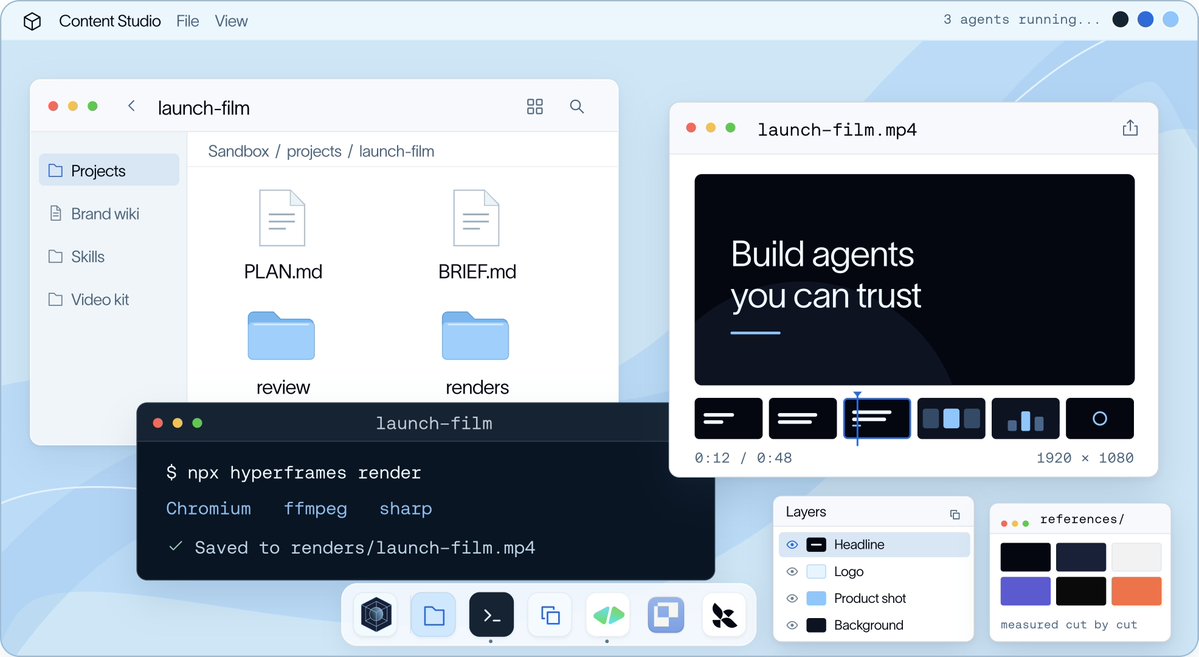
Design is iterative. You make something, look at it and change it, often many times. So the agent needs a computer it can keep working on across a whole conversation. Each Slack thread gets its own LangSmith Sandbox (opens in new tab), an isolated Linux machine with a filesystem and a shell, and the project lives there for the life of the thread.
Everything the agent creates is built with code, whether it’s an HTML page for a slide, a data spec for a chart, or an animation timeline for a video. This makes it easy to iterate without starting over. If someone asks to bring the parrot in earlier, the agent can change a single timing value and render again without affecting the artwork or copy. With a flat image or generated video clip, even a small edit could mean recreating the entire asset.
The brief, plan, scene code, audio and renders all live in one project folder, which every subagent on the job works from.

On top of that, we installed the tools a designer would reach for at each layer of the work:

Motion is the most difficult layer. It runs on two engines:
HyperFrames for editing: HyperFrames (opens in new tab), HeyGen’s open-source video framework, turns a video into a web page. Clips, screen recordings, captions and text are just elements on that page, and a GSAP (opens in new tab) timeline moves them around. So when someone asks to caption a webinar or cut a product demo, the agent edits it like a web page. Its CLI is basically the agent’s editing suite: lint the composition, pull a frame to check, render the cut. We also install HeyGen’s official skills (opens in new tab), so the agent learns the format from the people who built it.
motion-studio for animation: A web page can’t blur fast motion, make things glow or turn a logo in 3D, and that’s the finish we wanted for original animation. So we built our own canvas engine. The agent writes code that draws every pixel of every frame, and the engine blends up to 16 moments into each one, the same way a camera shutter blurs movement. The parrot film was made this way.
Both engines render each frame based on its timestamp, so a frame at ten seconds looks the same regardless of when it’s rendered. This lets the agent inspect individual moments without rendering the entire film, while also allowing us to render multiple frames in parallel. Audio runs on the same timeline, keeping narration, music, and sound effects synchronized with the visuals.
With this setup, the agent can create almost anything. But without further guidance, it defaults to the model’s own design choices rather than ours. The next challenge was teaching it to work within our brand and design standards.
Designer’s brain
We organized the agent’s knowledge around four distinct functions, each with a clear purpose. Skills guide how to perform specific tasks, while the wiki provides context about our company and what good work looks like. Anything measurable is handled by a gate, a deterministic check written in code. A separate memory layer captures what people teach the agent over time.
Skills
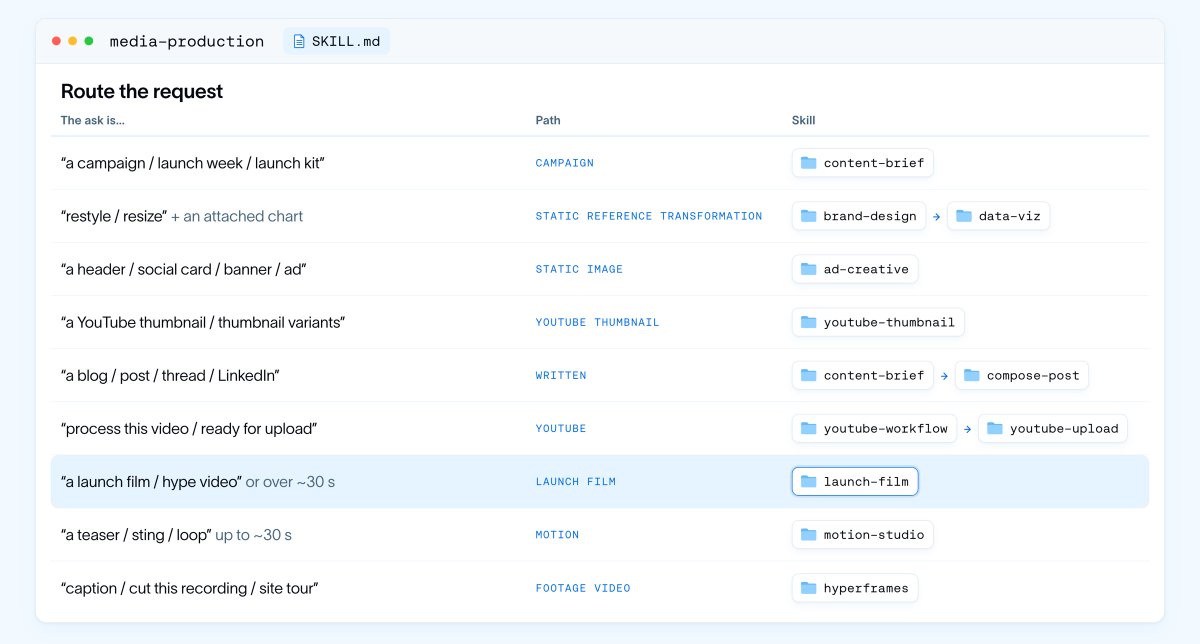
The first thing the agent does with a request is work out what kind of job it is. That’s handled by our media-production skill. We call it a router skill because most of it is one table. Each row maps a kind of ask (a campaign, a restyle, a thumbnail, a post, a YouTube package, a launch film, a short animation) to the path and the specialist skill that handle it. The router also decides whether the work needs a shared visual canvas, and it keeps small edits out of the full process.

For a film like the one above, the router picks the launch-film skill designed for directing a large motion production. Each of our 48 skills, close to 1,000 files in all, is scoped to a job rather than a topic, so its description reads like a routing rule, including when not to use it.
Skills compose instead of repeating each other. launch-film directs and motion-studio makes the picture and sound, so the craft of animation is written once. launch-film also carries role briefs for the subagents it will start, and a case study of a real 88-second launch film we rebuilt shot for shot in code. That case study is where the agent learned how to split a film between subagents. It cuts at hard scene changes, keeps a continuous camera move with one subagent, and freezes shared code before anyone works in parallel.

Descriptions matter for tools just as much as for skills. To keep context usage down, we put MCP tools behind a built-in search. The agent starts with only our own tools and loads additional tool schemas as needed, using keyword searches across tool names and descriptions.
Wiki
Skills explain how to do a job, while the wiki provides the context and reference material needed to do it well. It covers everything from brand tokens, graphic language, and voice to platforms, campaigns, and product information. A dedicated motion wiki covers directing, craft, sound, and review, alongside breakdowns of 70 reference films.
Rather than duplicating this information across skills, we link directly to the wiki. This keeps shared knowledge in one place and makes updates easier. When something like a font rule changes, we only need to update it once, and every skill can reference the latest version.

Knowing how we work doesn’t necessarily make motion design cheaper. A wrong creative decision can still cost hours of rendering.
Spec-driven design
Motion is especially expensive to get wrong, both in render time and tokens. A storyboard frame takes about 50 milliseconds to render, compared to 8 to 40 seconds for a single second of finished film. With subagents writing, rendering, and reviewing every act, those costs add up quickly. So the agent develops ideas in the storyboard first, where it can explore different directions cheaply, before moving into full production once a direction is approved.
To support that exploration, we gave the agent a library of reference films to draw inspiration from, much like a designer working from a mood board. When it can’t find the right look, it uses an image model to generate new references, starting with quick drafts before refining the most promising options. These images help establish the visual direction, while the storyboard and final film are still built in code using real typography and brand assets.

Once we pick a direction, the approved storyboard becomes the spec the rest of the film is built against. Then the project moves through three stages:
A storyboard, to agree on the visual idea, the copy and the shots.
An animatic, a rough cut timed to the audio, to check the pacing that stills can’t show.
Production, where subagents build, check and render the approved shots.
We first described this order in the skill’s instructions, and the agent sometimes skipped a review to save time. Now the pipeline enforces it in code, so assembly waits until every act passes review, while the instructions still guide the creative calls. The order that must always hold lives in code, and the judgment stays in the prompt.
Point, Don’t Prompt
Picking between those directions is a team decision. Slack works well for asking for work and receiving it, but a thread is linear text and a storyboard is spatial, so feedback ends up describing where something is instead of pointing at it, and every change, even a one-word fix, has to go back through the agent as a new prompt.
Paper (opens in new tab) solved this for us. It’s a design canvas built with agents in mind, with an MCP server that gives the agent direct control over the file. People can work in that same file, comparing directions side by side, leaving comments on specific frames, or making edits themselves. Because the canvas is shared, the agent can return to the file and use those comments and edits to guide its next iteration.
The challenge was that Paper’s agent tools only run inside its desktop app, while our agent operates in a cloud sandbox. To bridge that gap, we run Paper Desktop headlessly on an always-on Linux worker, using a virtual display and an authenticated bridge to connect the two. A single setup supports the entire team.

Even after approval, turning a storyboard into a finished film can take hours. By that point, the work resembles a small project, with multiple pieces being built in parallel that need to come together. Coordinating all of this is more than a single agent turn can handle.
Agent as a chief of staff
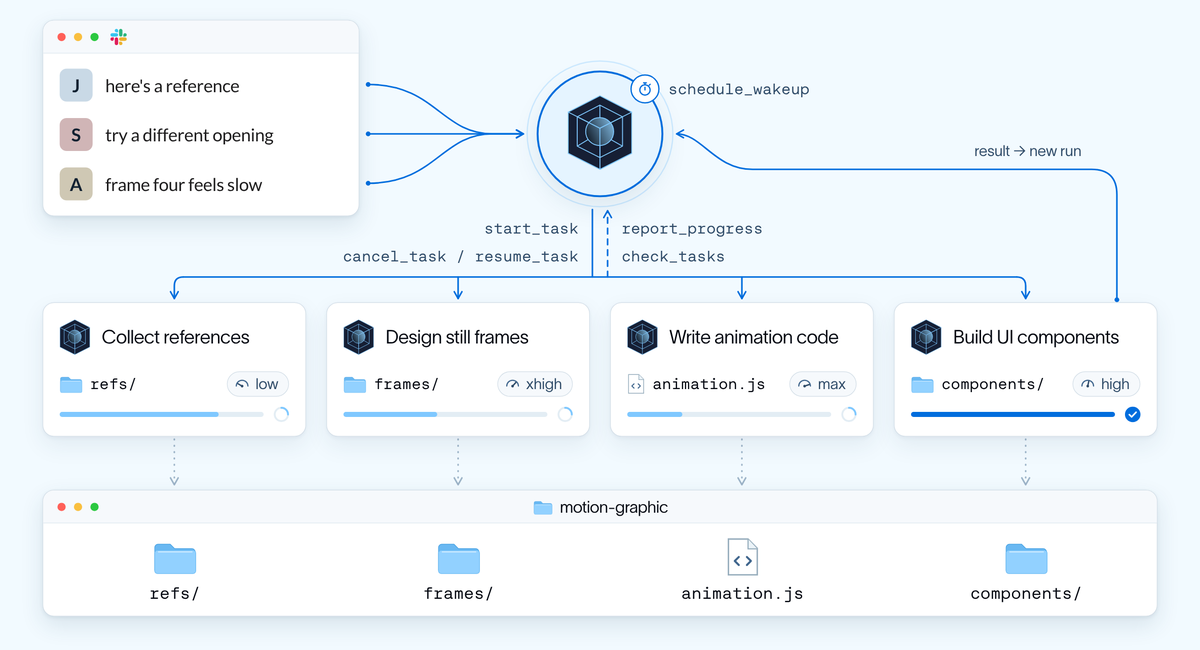
Consider the parrot film from earlier, midway through production in Slack. One person shares a reference, another suggests a different opening, and a third leaves feedback on frame four, all while the agent is still building. It’s like a brainstorm where the person taking notes is also responsible for making the film. Synchronous subagents don’t work well here because the main agent has to wait for them to finish, leaving no way for people to interact with it in the meantime.
To solve this, we made subagents asynchronous and shifted the main agent’s role from implementer to chief of staff. It breaks complex projects into smaller, isolated tasks, assigns them to subagents, and runs the work in parallel. Meanwhile, it keeps the team informed as things change, so people can continue giving feedback and steering the project.
For each task, the main agent creates a subagent profile with a clear brief covering its role, relevant context, file ownership, and how to validate the work. It also selects the model and effort level based on the complexity of the task.
We also added a small set of tools for the main agent to coordinate work:
start_task hands a part to a subagent in the background
check_tasks shows what’s running and reads finished reports
cancel_task and resume_task stop work that no longer fits the brief, or pick it up where it left off
report_progress lets a subagent send updates mid-job
schedule_wakeup gives the main agent a timer to trigger another run and continue the job
Under the hood, each subagent is the ordinary Deep Agents (opens in new tab) task tool running as a background task. When it finishes, our code queues a new run of the main agent carrying the result. People can also steer the main agent mid-run, since a message that arrives while it’s working is inserted before its next model call. The subagents coordinate through the project folder, each writing only the files it owns and keeping its progress on disk.

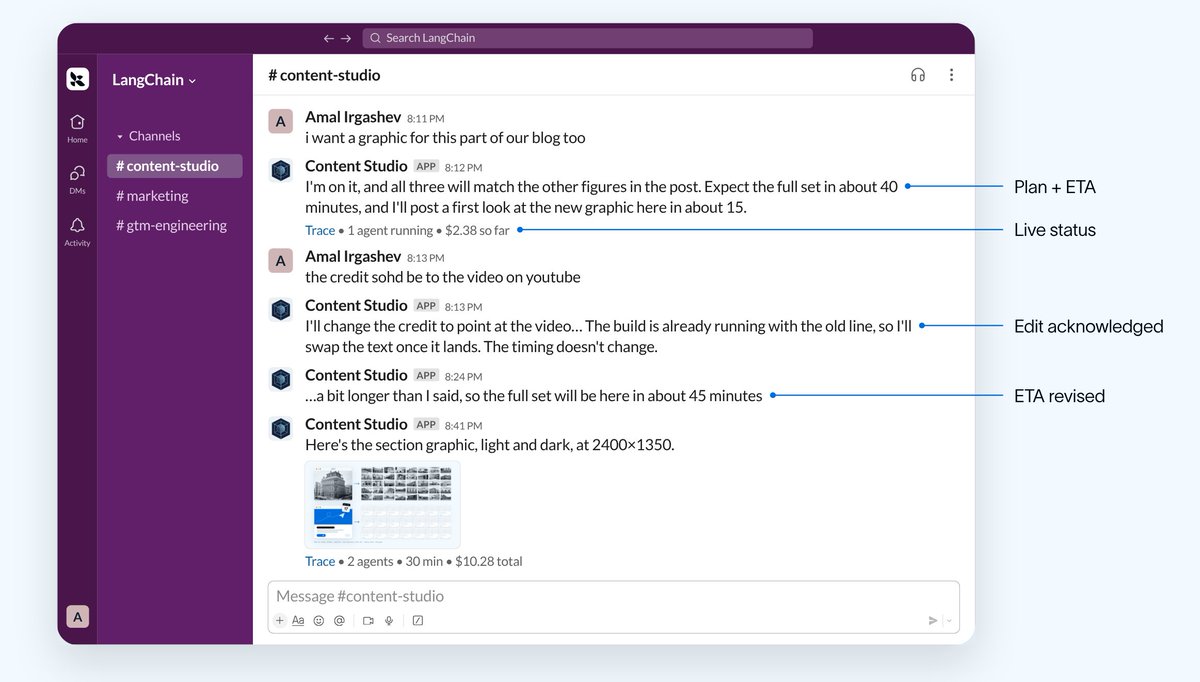
With the work running in the background, the thread has to show what’s happening. The main agent keeps it up to date with a plan and ETA, a live status line with running subagents, render progress and spend, an acknowledgment for each edit, and an approval card before anything goes public.

One of the clearest tests of this approach came from an overnight job to reskin a 52-slide presentation. The agent started by creating three sample slides and reviewing its own work before moving through the rest of the deck in numbered batches for approval. It also added two new slides along the way. Overnight, the main agent ran for about an hour while its subagents collectively worked for more than six hours, all without blocking the conversation.
The self-improving harness
A designer who’s worked with a team for months learns its preferences and doesn’t need to hear the same feedback twice. Without memory, the agent would start from scratch with every new thread. To avoid this, we built two learning loops. The fast loop captures feedback as people give it, while the slow loop learns from completed projects in the background.
The fast loop: When someone shares a rule or preference, the agent saves it in the same turn. Managed Deep Agents (opens in new tab) stores memory as plain files in two layers, one shared across the team and another specific to each person.

Personal preferences carry across threads, but shared standards take precedence, and anything created for a company channel follows the company voice. Each layer has an AGENTS.md file that loads with every model call. We now limit these files to a 200-line index after an early version grew to 500K tokens.
The slow loop: After each job, our learn_from_job tool launches a lightweight subagent that captures up to five evidence-backed lessons and associates them with the skill used. Future jobs read and rate those lessons, and once a week, a background agent incorporates the ones that prove useful into the skills and wiki.

What’s Next
Remember those early reviews? The biggest improvement came from capturing our designers’ judgment in a shared environment the agent could learn from, rather than leaving it scattered across review threads. In the process, we made design work accessible to more people.
Next, we want the agent to manage the entire campaign lifecycle, and some of that is already working. It publishes company social posts through Buffer once an authorized approver signs off, drafts posts for employees to share from their own accounts, and runs scheduled routines, including a daily review that suggests posts worth quoting.
Our goal is to take this further, so a single approved creative direction can carry an entire campaign from one thread. The agent would write the brief, create assets for each channel, schedule posts, help the team amplify them, and use performance data to inform the next campaign. People would still review and approve everything before it goes public.
Build your own design agent: The open-source repo (opens in new tab) has the harness from this post: the sandbox computer, skills, wiki and memory, async subagents and the Slack UX. Fork it, add your brand tokens, fonts and skills, and deploy it to your team’s Slack with Managed Deep Agents (opens in new tab).
Then join us at GTM Engineering Live (opens in new tab) on October 28. We’ll go under the hood of the harness and UX, and show the work that didn’t fit in this post.
- LangChain's Content Studio is an open-source Slack design agent built on Managed Deep Agents. Each Slack thread gets an isolated Linux sandbox that preserves its project; code-based assets and a shared project folder let the agent and subagents revise and rerender work without starting over. Teams can fork the repo, add brand tokens, fonts, and skills, and deploy it to Slack.
- Separate agent context by function: a router maps request types to workflows and specialist skills; 48 job-scoped skills span nearly 1,000 files, while a wiki centralizes company and design references and code gates enforce measurable checks. To limit context use, expose MCP tools through keyword search and load their schemas as needed.
- Encode subjective judgment as design principles, guardrails against common AI patterns, and the reasoning behind feedback. Their fast learning loop saves feedback to shared or personal memory files; after each job, a subagent captures up to five evidence-backed lessons, with useful lessons incorporated into skills and the wiki weekly. After Opus 5.5 improved output, they removed most hard-coded rules while retaining principles and high-level guidance.
- For expensive media work, explore in a storyboard first—about 50 ms per frame versus 8–40 seconds to render one second of finished film—then approve a direction before animatic and production; enforce this order in code because prompt instructions alone sometimes let the agent skip review.
- For hours-long projects, make the main agent a coordinator that delegates asynchronous tasks with briefs specifying role, context, file ownership, and validation, and selects model and effort based on task complexity. Keep the team able to steer the work with progress updates, a plan and ETA, live status and spend, and an approval step before publication. In an overnight 52-slide reskin, the agent reviewed three sample slides before building the rest in approval batches; the main agent ran for about an hour while subagents worked for more than six hours.
- LangChain reports that Content Studio has delivered over 3,000 assets, including more than 80 decks; median model spend per request fell from about $8 in mid-September to about 50 cents, and its code shrank about 80% after migrating to Managed Deep Agents.
- LangChain’s open-source Content Studio is a Slack design agent built on Managed Deep Agents. Each Slack thread gets an isolated Linux sandbox that preserves the project across turns; assets are built as code, so the agent can make targeted edits and rerender, and subagents share the project folder.
- For complex jobs, the main agent acts as a coordinator: it delegates isolated tasks to async subagents, gives each a brief with its role, context, file ownership, and validation criteria, and selects a model and effort level for the task. People can steer work mid-run; Slack shows the plan, ETA, progress, spend, and an approval step before anything goes public. An overnight reskin of a 52-slide deck used three sample slides and approval before the agent continued in batches; the main agent ran about an hour while subagents worked for more than six hours collectively.
- Keep knowledge and execution rules structured: job-specific skills route work, a shared wiki holds reusable context, and deterministic checks handle measurable requirements. The team also enforces required workflow stages in code while leaving creative judgment to instructions.
- Treat model-specific workarounds as temporary: after Opus 5.5 improved, LangChain removed most hard-coded rules while retaining design principles, and reported more varied, less repetitive results. Content Studio has delivered over 3,000 assets; median model spend per request fell from about $8 to about $0.50, and the team’s code shrank about 80% after migrating to Managed Deep Agents.
- LangChain’s open-source Content Studio is a Slack design agent built on Managed Deep Agents; developers can fork its harness, add their brand tokens, fonts, and skills, and deploy it to a team’s Slack.
- Give each project a persistent, isolated sandbox: Content Studio keeps a Linux filesystem and shell for the life of a Slack thread, and stores briefs, plans, code, audio, and renders together. Because assets are built with code, the agent can make targeted edits without recreating the whole asset. For video, its setup uses HyperFrames and GSAP for web-page-based editing, plus a custom motion-studio engine; timestamp-based rendering lets the agent inspect individual frames and render frames in parallel.
- Separate agent knowledge by function: task-specific skills route and guide jobs, a shared wiki holds brand and craft context, code handles measurable gates, and memory captures learned preferences. To limit context use, MCP tools are exposed through search and their schemas loaded as needed. A practical feedback loop saves preferences during a job, then has a lightweight subagent capture up to five evidence-backed lessons after the job; useful lessons are incorporated into skills and the wiki weekly.
- For expensive creative work, explore in a storyboard first (about 50 ms per frame versus 8–40 seconds to render a second of finished film), then proceed through approved storyboard, animatic, and production; code enforces the stage order. For long jobs, the main agent delegates isolated tasks asynchronously, briefs subagents on role, context, file ownership, and validation, and selects model and effort based on task complexity. It keeps the team updated with a plan, ETA, live status, and approval step, while people can steer it mid-run.
- Avoid keeping workarounds for model limitations indefinitely: an early harness used 115 reusable components, but produced repetitive layouts; after Opus 5.5 improved output, the team removed most hard-coded rules while retaining design principles and high-level guidance. Content Studio has delivered over 3,000 assets, and its median request’s model spend fell to about $0.50 from about $8 in mid-September; LangChain also reports its own code shrank by about 80% after migrating to Managed Deep Agents.
- Keep agent outputs editable and code-native: Content Studio represents slides as HTML, charts as data specs, and films as animation timelines, so a requested change can be a small edit rather than regenerating an asset. Each Slack thread gets a persistent Linux sandbox, and subagents share the project folder.
- For costly creative work, explore in a storyboard before production: storyboard frames take about 50 ms to render versus 8–40 seconds per second of finished film. Use the approved storyboard as the spec, then move through animatic and production; enforce required review gates in code while leaving subjective creative decisions to the agent and reviewers.
- Run long jobs with asynchronous subagents and a coordinating main agent: split work into isolated tasks with clear briefs, file ownership, and validation criteria; choose model and effort level by task complexity; and show the team the plan, ETA, progress, and spend while allowing mid-run feedback.
- Capture reusable judgment in skills and evidence-backed lessons, and remove hard-coded workarounds when stronger models make them unnecessary; LangChain reports that removing most such rules after a model improvement increased variety and reduced repetition.